


Ask Question Forum:
Model Library:2025-02-08 Updated:A.I. model is online for auto reply question page
C
O
M
P
U
T
E
R
2
8
Show
#
ASK
RECENT
←
- Underline
- Bold
- Italic
- Indent
- Step
- Bullet
- Quote
- Cut
- Copy
- Paste
- Table
- Spelling
- Find & Replace
- Undo
- Redo
- Link
- Attach
- Clear
- Code
Below area will not be traslated by Google,you can input code or other languages
Hint:If find spelling error, You need to correct it,1 by 1 or ignore it (code area won't be checked).
X-position of the mouse cursor
Y-position of the mouse cursor
Y-position of the mouse cursor
Testcursor
caretPos
Attachment:===
Asked by mikesExpertExchange
at 2024-09-03 07:47:39
 Modify
Point:0 Replies:19 POST_ID:829215USER_ID:12090
Topic:
Experts Exchange Bugs;;
Why does my Experts Exchange home page show up like this in my browser?
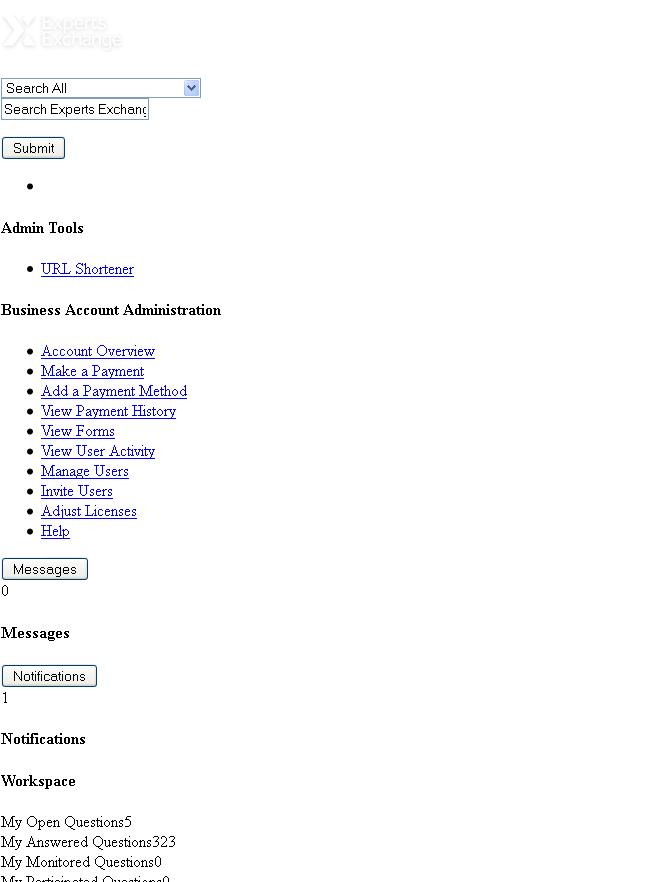
none of the other pages in the site (that i've visited do)
Expert: Netminder replied at 2024-09-04 11:45:43
*smile*
We take care of the questions in Community Support; we generally like to leave them open until a problem is resolved, but what happens is that a member will report a problem, we'll say "okay, we'll file the bug", and then the member would close the question -- and we'd lose track of it.
Thanks!
N
We take care of the questions in Community Support; we generally like to leave them open until a problem is resolved, but what happens is that a member will report a problem, we'll say "okay, we'll file the bug", and then the member would close the question -- and we'd lose track of it.
Thanks!
N
Author: mikesExpertExchange replied at 2024-09-04 07:25:22
That was the issue. It is resolved. How do I close this? Do I accept my own solution as "the solution"? It won't allow my to chose any of your responses as the solution and having my issues solved like this is a first for me.
Expert: Netminder replied at 2024-09-03 14:09:30
There you go... that's the problem. Just make sure you tell them you're not asking for the entire cachefly.net system -- just the experts.cachefly.net part, and only for style sheets and images.
Netminder
Netminder
Author: mikesExpertExchange replied at 2024-09-03 13:46:20
this is the message i'm getting:
"The website you are trying to access has been blocked by the Barracuda Web Filter because it is in the Block Streaming Sites UnCat category.
If you believe this is an error or need to access this link, please submit a Support Ticket from http://corp.arrowtruck.com/MISRequest/Index.aspx.
URL: http://experts.cachefly.net"
"The website you are trying to access has been blocked by the Barracuda Web Filter because it is in the Block Streaming Sites UnCat category.
If you believe this is an error or need to access this link, please submit a Support Ticket from http://corp.arrowtruck.com/MISRequest/Index.aspx.
URL: http://experts.cachefly.net"
Author: mikesExpertExchange replied at 2024-09-03 13:45:01
and yes, further more the message from Baracuda Web Filter lists the http://experts.cachefly.net/ site you mentioned above.
Author: mikesExpertExchange replied at 2024-09-03 13:42:31
ahh i see. of those 3 links I can only get to the middle one. the other two are blocked by Baracuda. There is a link in the message for me to go to, but I probably should talk to my network / security person about it huh?
Accepted Solution
Expert: Netminder replied at 2024-09-03 13:23:17
Best guess:
It looks like the style sheet isn't loading, so the most likely possibility is that you're not allowing a page (like http://www.experts-exchange.com/Community_Support/EE_Bugs/Q_28510707.html) to call on another page for some of the elements, specifically http://experts.cachefly.net/ . There are calls to other sites that load as well, notably apis.google.com, plus.google.com, redsourceinteractive.com (EE's parent company), googleadservices.com, doubleclick.net and marketo.net.
That could be a setting in Firefox, or a firewall setting.
Another possibility is the age of the browser; are you using a recent version?
I'm having trouble filling in what the question is asking. "whether you are able to all network file download from EE such as css file or not?
I'm pretty sure that's asking you "If you copy this URL and then paste it into the address box of a new tab, does anything appear?"
http://experts.cachefly.net/css/2/da42d30b1e4a76ef79eecd766cf81283f22b5499d1ad9d105159266c87da8a26.css
or this one
http://fonts.googleapis.com/css?family=Open+Sans:400,300,700
or this one
http://experts.cachefly.net/images/experts-exchange/favicon.ico
Netminder
Senior Admin
It looks like the style sheet isn't loading, so the most likely possibility is that you're not allowing a page (like http://www.experts-exchange.com/Community_Support/EE_Bugs/Q_28510707.html) to call on another page for some of the elements, specifically http://experts.cachefly.net/ . There are calls to other sites that load as well, notably apis.google.com, plus.google.com, redsourceinteractive.com (EE's parent company), googleadservices.com, doubleclick.net and marketo.net.
That could be a setting in Firefox, or a firewall setting.
Another possibility is the age of the browser; are you using a recent version?
I'm having trouble filling in what the question is asking. "whether you are able to all network file download from EE such as css file or not?
I'm pretty sure that's asking you "If you copy this URL and then paste it into the address box of a new tab, does anything appear?"
http://experts.cachefly.net/css/2/da42d30b1e4a76ef79eecd766cf81283f22b5499d1ad9d105159266c87da8a26.css
or this one
http://fonts.googleapis.com/css?family=Open+Sans:400,300,700
or this one
http://experts.cachefly.net/images/experts-exchange/favicon.ico
Netminder
Senior Admin
Author: mikesExpertExchange replied at 2024-09-03 09:26:12
@rwniceing: I don't know how to use FF developer tools to do what you're asking. I think your question is maybe missing a word or two. I'm having trouble filling in what the question is asking. "whether you are able to all network file download from EE such as css file or not?"
Expert: Gary replied at 2024-09-03 08:43:31
Don't do anything until EE responds - it may be an issue with them.
Experts leave this thread to the EE staff.
Experts leave this thread to the EE staff.
Expert: rwniceing replied at 2024-09-03 08:41:17
If you say it is also problem on IE that might NOT solve the issue on re-install FF
Do you know how to use FF developer tools to check whether you are able to
all network file donwload from EE such as its css file or not ?
Do you know how to use FF developer tools to check whether you are able to
all network file donwload from EE such as its css file or not ?
Author: mikesExpertExchange replied at 2024-09-03 08:39:08
if I uninstall FF will I lose my favorites etc.?
Author: mikesExpertExchange replied at 2024-09-03 08:38:33
I don't have chrome, but I do get the same results in IE8 (the latest version of IE that my company has for some reason.
Expert: Gary replied at 2024-09-03 08:33:22
Moved to Community Support as this may be a bug
Expert: rwniceing replied at 2024-09-03 08:33:20
How about it works on Chrome, IE ?
If still not working, uninstall FF and re-install it
If still not working, uninstall FF and re-install it
Author: mikesExpertExchange replied at 2024-09-03 08:18:19
ok. none of the suggestions have worked so far, with the exception of restarting my PC. I'll do that at the end of the day.
Expert: viki2000 replied at 2024-09-03 08:10:26
or just restart your PC
Expert: rwniceing replied at 2024-09-03 08:08:35
If those suggestion are still not working, try to reset Firefox to its default setting which describe at this links at https://support.mozilla.org/en-US/kb/reset-firefox-easily-fix-most-problems and
http://en.kioskea.net/faq/1154-firefox-reset-to-default-settings
http://en.kioskea.net/faq/1154-firefox-reset-to-default-settings
Expert: Brad Groux replied at 2024-09-03 07:57:43
Clear your cache in FireFox - https://support.mozilla.org/en-US/kb/how-clear-firefox-cache
Expert: Gary replied at 2024-09-03 07:51:39
Just do an hard refresh - you are missing the stylesheets
