

Click
➕ then input your friend new registered RoomID then Click ➕ again
Now your friend RoomID at Computer|List OR PhoneBook
Select your friend RoomID in RoomID list, then Click

OR
to connect your friend in this video room
Accept
into this room
Room
Apps Version
Share
Website
Attach
Computer
|List
PhoneBook
Input RoomID then Click +
If checkbox is tick,block all coming call-in Except those Room in your Room list that you "ADD" before or after
We will update this video apps version & fix any problem if any (Normally, we will update/fix it automatically,Please don't use this function frequently, this function is just for in case only) Now we are going to proceed this if click OK
This function is for Android Mobile Device only
Start Screen Recorder
Stop Screen Recorder
Wait to stop recorder
Be Reminded: We detected your video location connection code is changed or NEW
We will automatically send your new location code to your friends from your phonelist.
-------------The best and safe------------
You call your Member friends firstly to gurantee they get your most update location code
Guest must call you firstly
Please click Name in Room list below,Room will be shown in the input box
Guest Account can not add Room,Just select Room below then click Green Call button(call Mobile Phone) OR Notebook PC image(call PC/Macbook) to connect your member account owner
Not allow add own Room
This Member Room is no longer in Service or changed,Please relogin with New Member Room
Room,###,Invalid Guest Password,Please login with his new GuestPassword
For first time use of this video apps, Please create/change new display name
The Room you calling now already in this Room
Since you just Sign-out before, this time, Please use other keys to close this window
Since you just Sign-out before, this time, Please use X close button to close this window
Please select a file
Wait 30 seconds to stop recorder first
Wait to stop recorder first
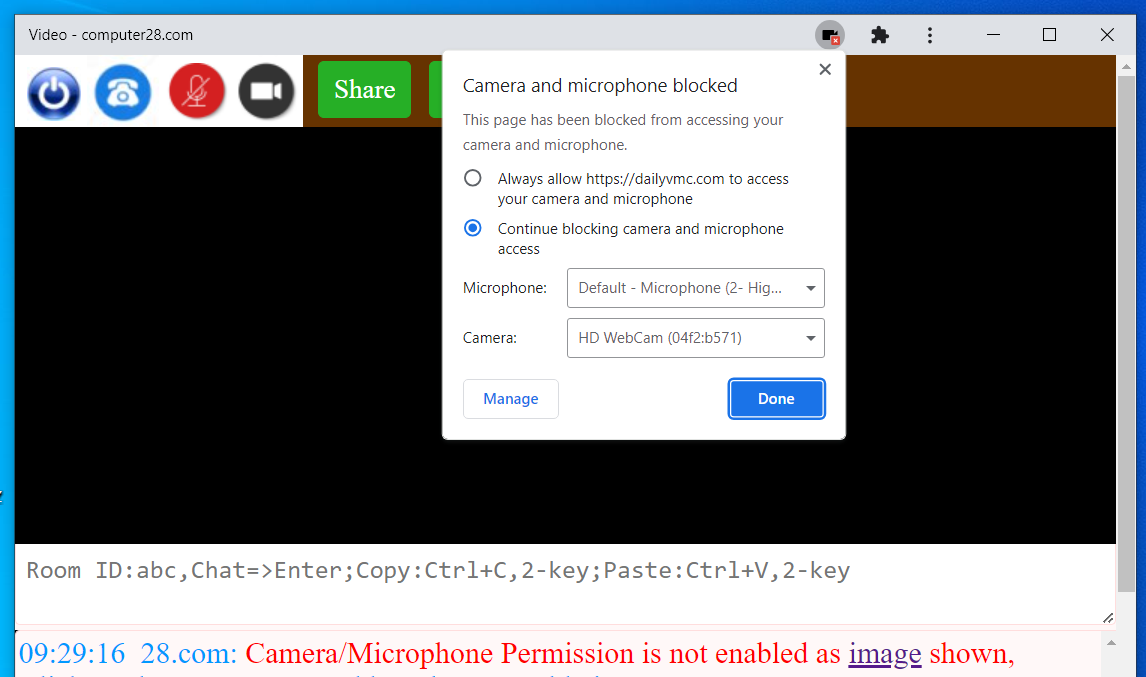
Please click button that Always allow to access camera and microphone
This application is only for Google or Microsoft Browser
This is Browser Apps for "Non-Android phone" only.\n\nPlease Click Google Play Logo to install our Android video apps for Login or Register\n
Registered Email Address can be also as Room
Please login first before change display name
Password function is disabled. In other words, every time login, you need to get new & different Logic Verfication Code in order to access your account until password is reset at ForgetORChangePassword/Room. Login Veification Code will be expired once login success
This service is not ready yet
Database Server is busy,Please try it later:2
Database Server is busy,Please try it later
Your Guest changed his location token\nWe just save member accounts' location token in our database.\n\nAsk him call you first OR Ask him register Member Account
No such Room
Last Updated
LoadTime
Code
Name
MemberName
Guest
AppsVersion
Android
Previous
Email
Your Device
Mobile
Memory
CPU
Connection
Browser
Mobile Apps
Local
camera-on
voice-on
camera-off
voice-off
word-notation
Only allow
Registration Form
Room|ID is NOT existed
Registered Email is NOT existed
Invalid Email address
Invalid Password ,Pls try it again
You can send any http
website/youtube from chat box to screen above(if the website allow it )(if not allow, try to click share)
Read
Delete
Files are sent
Download Only, Click file name
Choose File
We have detected your video apps is already installed. It is NOT neccessary to login here again.
To run/activate your video apps, please click 28.com logo on your desktop home screen or toolbar as image shown. If change password/displayname/login other room id, Please click =>︙=>Login on your video apps ---------------------------------------------------------------------------------------------------------------------------------------------------------------------------------------
To run/activate your video apps, please click 28.com logo on your desktop home screen or toolbar as image shown. If change password/displayname/login other room id, Please click =>︙=>Login on your video apps ---------------------------------------------------------------------------------------------------------------------------------------------------------------------------------------
If you still can NOT find the video apps on your desktop home screen or toolbar
Please click the arrow image on the right top corner on this window.
Click Open => Click ︙ => Uninstall video => Remove.....
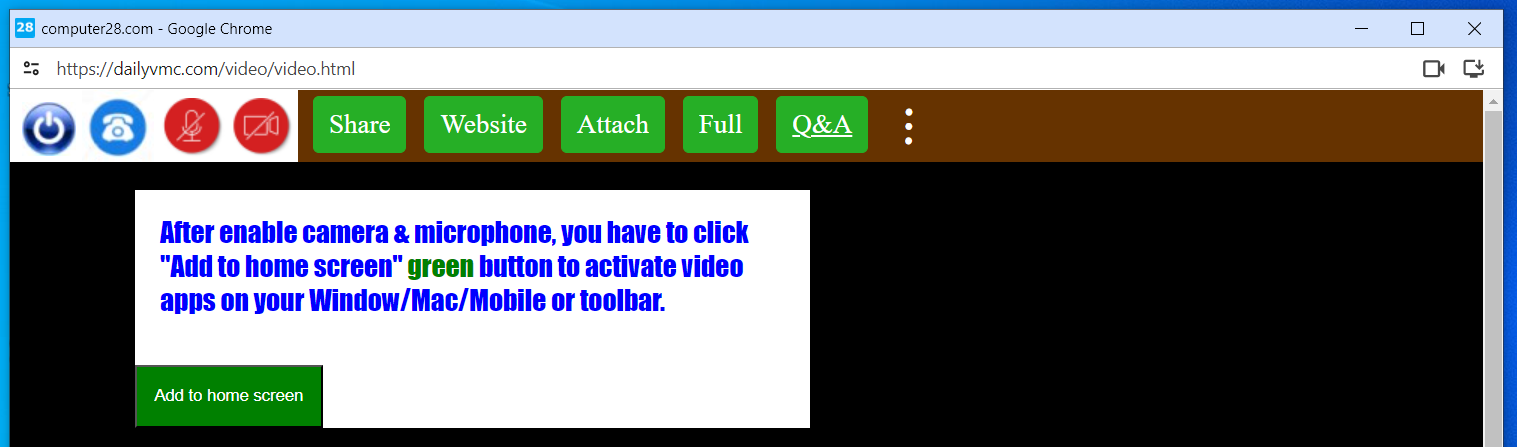
Now, you can Log-in again & see the following image, just click Add to home screen to run/activate your video apps
And 28.com logo is shown on your desktop home screen or toolbar
Click
/
︙ AND
install app at right-top corner
to activate this video apps
After installed, then click
Submit
 : Install video apps on desktop
OR
: Install video apps on desktop
OR
 : Open video apps that you already
installed before on desktop
If installed, next time just click 28.com video apps logo on desktop/taskbar
If can not find video apps on desktop,
Click this
: Open video apps that you already
installed before on desktop
If installed, next time just click 28.com video apps logo on desktop/taskbar
If can not find video apps on desktop,
Click this
: Install video apps on desktop
OR
: Open video apps that you already
installed before on desktop
If installed, next time just click 28.com video apps logo on desktop/taskbar
If can not find video apps on desktop,
Click this
Cloudflare Security Protection Server is loading.....
JavaScript is disabled.Please turn it on
WeTalk28.com
Close Apps Save RoomID List
Start Screen Recorder
User Profile

Sign-out/ChangeName/Room
Accept Box
Block All Call Except RoomID List
RemoveAllPhoneNotification
Software Update/Fix
Privacy Policy & Term of Condition
Send Files to Your Member or Guest
Example of Window Sharing Screen/Attached File Uploaded
Upload Files:
Download Files:

:
Mute
..
Name:computer
Room : yourexample@gmail.com

Change Image
No-Tone
Sound
Disable Phone Function
RoomID:
@gmail
Bigger file size will be longer compression time
Disable Phone Function
點選
/
︙ 和
在右上角安裝應用程式
啟動此視像應用程式
安裝後,然後點擊
提交
:在桌面上安裝視像應用程式
或者
:打開您已經使用的視像應用程式
之前安裝在桌面上
如果已安裝,下次只需點擊桌面/工作列上的 28.com 視像應用程式徽標
如果在桌面上找不到視像應用程序,
點擊這個
:在桌面上安裝視像應用程式
或者
:打開您已經使用的視像應用程式
之前安裝在桌面上
如果已安裝,下次只需點擊桌面/工作列上的 28.com 視像應用程式徽標
如果在桌面上找不到視像應用程序,
點擊這個
Console.log test