


Ask Question Forum:
Model Library:2025-02-08 Updated:A.I. model is online for auto reply question page
C
O
M
P
U
T
E
R
2
8
Show
#
ASK
RECENT
←
- Underline
- Bold
- Italic
- Indent
- Step
- Bullet
- Quote
- Cut
- Copy
- Paste
- Table
- Spelling
- Find & Replace
- Undo
- Redo
- Link
- Attach
- Clear
- Code
Below area will not be traslated by Google,you can input code or other languages
Hint:If find spelling error, You need to correct it,1 by 1 or ignore it (code area won't be checked).
X-position of the mouse cursor
Y-position of the mouse cursor
Y-position of the mouse cursor
Testcursor
caretPos
Attachment:===
Asked by BharathKumarRaju DasaraRaju
at 2024-07-26 16:30:00
 Modify
Point:500 Replies:31 POST_ID:829123USER_ID:11540
Topic:
Apache Web Server;Linux;Web Servers
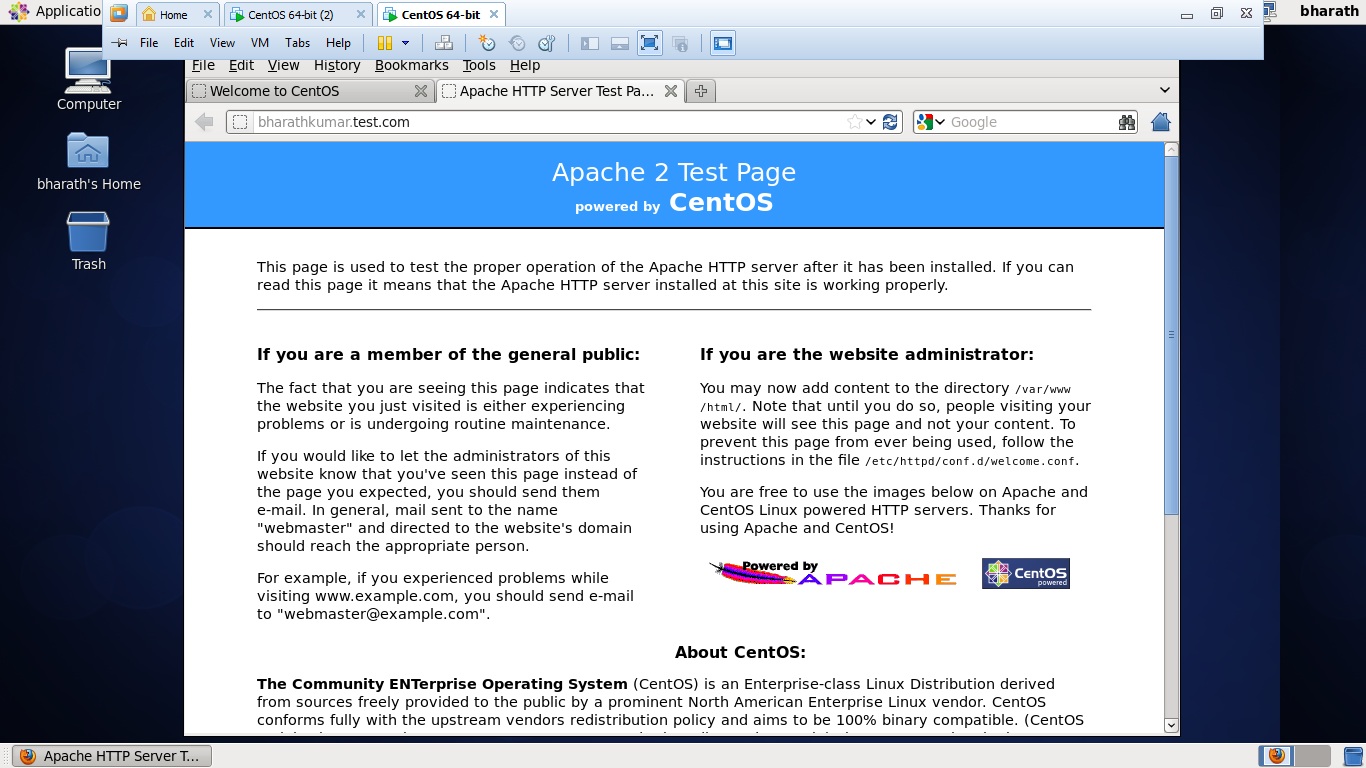
Hi i installed apache in centos linux, while checking in browser(http://bharathkumar.test.com) please see below attachment. but while wgetting i am getting the below error, kindly help me please
[root@bharathkumar conf.d]# wget http://bharathkumar.test.com
--2014-07-26 16:25:48-- http://bharathkumar.test.com/
Resolving bharathkumar.test.com... 192.168.80.129
Connecting to bharathkumar.test.com|192.168.80.129|:80... connected.
HTTP request sent, awaiting response... 403 Forbidden
2014-07-26 16:25:48 ERROR 403: Forbidden.
[root@bharathkumar conf.d]#
Author: BharathKumarRaju DasaraRaju replied at 2024-07-26 22:02:44
[root@bharathkumar conf.d]# find / -type f -name "apachectl" -ls
276312 4 -rwxr-xr-x 1 root root 3916 Feb 22 2013 /usr/sbin/apachectl
^C
[root@bharathkumar conf.d]# /usr/sbin/apachectl -v
Server version: Apache/2.2.15 (Unix)
Server built: Feb 22 2013 11:19:58
[root@bharathkumar conf.d]# cat /etc/*release*
CentOS release 6.4 (Final)
CentOS release 6.4 (Final)
CentOS release 6.4 (Final)
cpe:/o:centos:linux:6:GA
[root@bharathkumar conf.d]#
276312 4 -rwxr-xr-x 1 root root 3916 Feb 22 2013 /usr/sbin/apachectl
^C
[root@bharathkumar conf.d]# /usr/sbin/apachectl -v
Server version: Apache/2.2.15 (Unix)
Server built: Feb 22 2013 11:19:58
[root@bharathkumar conf.d]# cat /etc/*release*
CentOS release 6.4 (Final)
CentOS release 6.4 (Final)
CentOS release 6.4 (Final)
cpe:/o:centos:linux:6:GA
[root@bharathkumar conf.d]#
Expert: duncanb7 replied at 2024-07-26 21:58:50
Just want to know linux dist and apache from Apache/2.2.15 (CentOS)
reinstall wget for centos if curl is working, hardware should be okay
Duncan
reinstall wget for centos if curl is working, hardware should be okay
Duncan
Author: BharathKumarRaju DasaraRaju replied at 2024-07-26 21:52:21
Could you see this tell me any troubleshoot require?
[root@bharathkumar aws]# wget --server-response --spider http://bharathkumar.test.com
Spider mode enabled. Check if remote file exists.
--2014-07-26 21:50:40-- http://bharathkumar.test.com/
Resolving bharathkumar.test.com... 192.168.80.129
Connecting to bharathkumar.test.com|192.168.80.129|:80... connected.
HTTP request sent, awaiting response...
HTTP/1.1 403 Forbidden
Date: Sun, 27 Jul 2014 04:50:40 GMT
Server: Apache/2.2.15 (CentOS)
Accept-Ranges: bytes
Content-Length: 5039
Connection: close
Content-Type: text/html; charset=UTF-8
Remote file does not exist -- broken link!!!
[root@bharathkumar aws]#
[root@bharathkumar aws]# wget --server-response --spider http://bharathkumar.test.com
Spider mode enabled. Check if remote file exists.
--2014-07-26 21:50:40-- http://bharathkumar.test.com/
Resolving bharathkumar.test.com... 192.168.80.129
Connecting to bharathkumar.test.com|192.168.80.129|:80... connected.
HTTP request sent, awaiting response...
HTTP/1.1 403 Forbidden
Date: Sun, 27 Jul 2014 04:50:40 GMT
Server: Apache/2.2.15 (CentOS)
Accept-Ranges: bytes
Content-Length: 5039
Connection: close
Content-Type: text/html; charset=UTF-8
Remote file does not exist -- broken link!!!
[root@bharathkumar aws]#
Author: BharathKumarRaju DasaraRaju replied at 2024-07-26 21:48:51
hi duncanb7,
Thank you so much i didn't use any proxy , however internet not working in my machine so unable to ping...the best thing reinstall the wget...thank you have a nice weekend :)
Thank you so much i didn't use any proxy , however internet not working in my machine so unable to ping...the best thing reinstall the wget...thank you have a nice weekend :)
Accepted Solution
Expert: duncanb7 replied at 2024-07-26 19:48:32
100 points EXCELLENT
Dear author,
Last questions:
1- Did you use proxy server on your linux ?
2- Check wget http://yahoo.com ( other sites work or not ?)
3- if item-2 not work, Try to re-install wget from instruction at http://petio.org/tools/wget.html
Duncan
Last questions:
1- Did you use proxy server on your linux ?
2- Check wget http://yahoo.com ( other sites work or not ?)
3- if item-2 not work, Try to re-install wget from instruction at http://petio.org/tools/wget.html
Duncan
Assisted Solution
Expert: duncanb7 replied at 2024-07-26 19:34:53
100 points EXCELLENT
Curl works, but not on wget, solution is closer , please check this command out
wget --server-response --spider http://bharathkumar.test.com
wget --server-response --spider http://bharathkumar.test.com
Author: BharathKumarRaju DasaraRaju replied at 2024-07-26 19:28:22
no problem..and thanks for your answers..
please find the attachment
please find the attachment
Assisted Solution
Expert: duncanb7 replied at 2024-07-26 19:23:37
100 points EXCELLENT
sorry, just this without "-O"
curl http://bharathkumar.test.com
if curl is not working, it might be linux internal setup issue
curl http://bharathkumar.test.com
if curl is not working, it might be linux internal setup issue
Author: BharathKumarRaju DasaraRaju replied at 2024-07-26 19:19:47
[root@bharathkumar .ssh]# curl -O http://bharathkumar.test.com
curl: Remote file name has no length!
curl: try 'curl --help' or 'curl --manual' for more information
[root@bharathkumar .ssh]#
curl: Remote file name has no length!
curl: try 'curl --help' or 'curl --manual' for more information
[root@bharathkumar .ssh]#
Expert: duncanb7 replied at 2024-07-26 19:07:12
Author: BharathKumarRaju DasaraRaju replied at 2024-07-26 18:59:50
no nothing i setted up
Expert: duncanb7 replied at 2024-07-26 18:49:30
Dear Author,
I mean on your local computer router , you can go 192.168.0.1 for browser admin setup
to check any port forwarding
Duncan
I mean on your local computer router , you can go 192.168.0.1 for browser admin setup
to check any port forwarding
Duncan
Author: BharathKumarRaju DasaraRaju replied at 2024-07-26 18:45:31
[root@bharathkumar ~]# iptables --list
Chain INPUT (policy ACCEPT)
target prot opt source destination
ACCEPT all -- anywhere anywhere state RELATED,ESTABLISHED
ACCEPT icmp -- anywhere anywhere
ACCEPT all -- anywhere anywhere
ACCEPT tcp -- anywhere anywhere state NEW tcp dpt:ssh
REJECT all -- anywhere anywhere reject-with icmp-host-prohibited
Chain FORWARD (policy ACCEPT)
target prot opt source destination
REJECT all -- anywhere anywhere reject-with icmp-host-prohibited
Chain OUTPUT (policy ACCEPT)
target prot opt source destination
[root@bharathkumar ~]# iptables -t nat -vnL
Chain PREROUTING (policy ACCEPT 0 packets, 0 bytes)
pkts bytes target prot opt in out source destination
Chain POSTROUTING (policy ACCEPT 0 packets, 0 bytes)
pkts bytes target prot opt in out source destination
Chain OUTPUT (policy ACCEPT 0 packets, 0 bytes)
pkts bytes target prot opt in out source destination
Chain INPUT (policy ACCEPT)
target prot opt source destination
ACCEPT all -- anywhere anywhere state RELATED,ESTABLISHED
ACCEPT icmp -- anywhere anywhere
ACCEPT all -- anywhere anywhere
ACCEPT tcp -- anywhere anywhere state NEW tcp dpt:ssh
REJECT all -- anywhere anywhere reject-with icmp-host-prohibited
Chain FORWARD (policy ACCEPT)
target prot opt source destination
REJECT all -- anywhere anywhere reject-with icmp-host-prohibited
Chain OUTPUT (policy ACCEPT)
target prot opt source destination
[root@bharathkumar ~]# iptables -t nat -vnL
Chain PREROUTING (policy ACCEPT 0 packets, 0 bytes)
pkts bytes target prot opt in out source destination
Chain POSTROUTING (policy ACCEPT 0 packets, 0 bytes)
pkts bytes target prot opt in out source destination
Chain OUTPUT (policy ACCEPT 0 packets, 0 bytes)
pkts bytes target prot opt in out source destination
Assisted Solution
Expert: duncanb7 replied at 2024-07-26 18:25:40
100 points EXCELLENT
Dear Author,
Did you do something like port forwarding for 80 on router or from other software setup ?
it might affect wget result on linux shell, On browser, port fowarding 80 that might be okay, since
browser vendor might not use port 80 for http or they will use dynamic port for http.
Please check it
Duncan
Did you do something like port forwarding for 80 on router or from other software setup ?
it might affect wget result on linux shell, On browser, port fowarding 80 that might be okay, since
browser vendor might not use port 80 for http or they will use dynamic port for http.
Please check it
Duncan
Author: BharathKumarRaju DasaraRaju replied at 2024-07-26 18:01:05
i am running an linux machine inside vmware worksation. vmwware workstation has been installed in the my windows 7 machine. And i am connection the linux VM via ssh from putty from my windows7 machine
Expert: Gary replied at 2024-07-26 17:57:19
And are you running the terminal inside the VM?
What is inside Windows has nothing to do with the Linux VM
What is inside Windows has nothing to do with the Linux VM
Author: BharathKumarRaju DasaraRaju replied at 2024-07-26 17:54:59
Hi Gary,
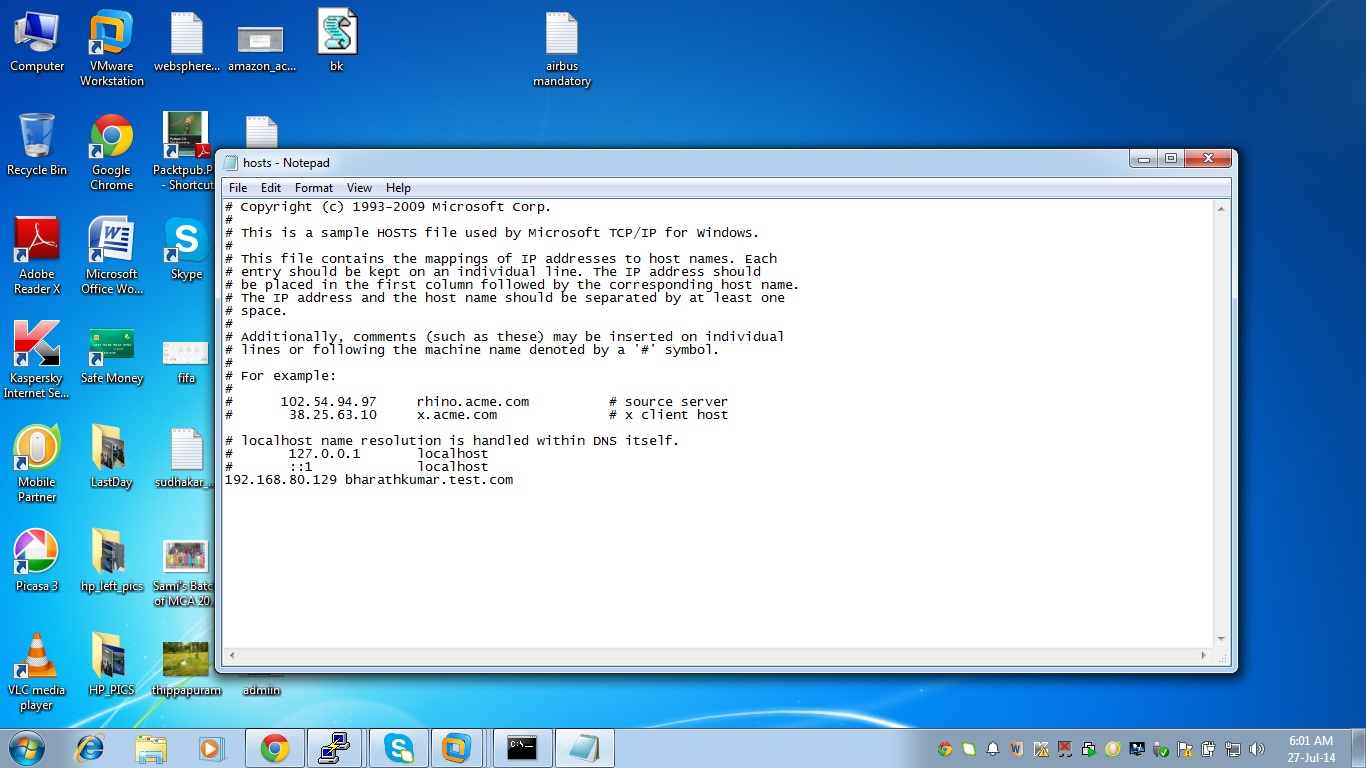
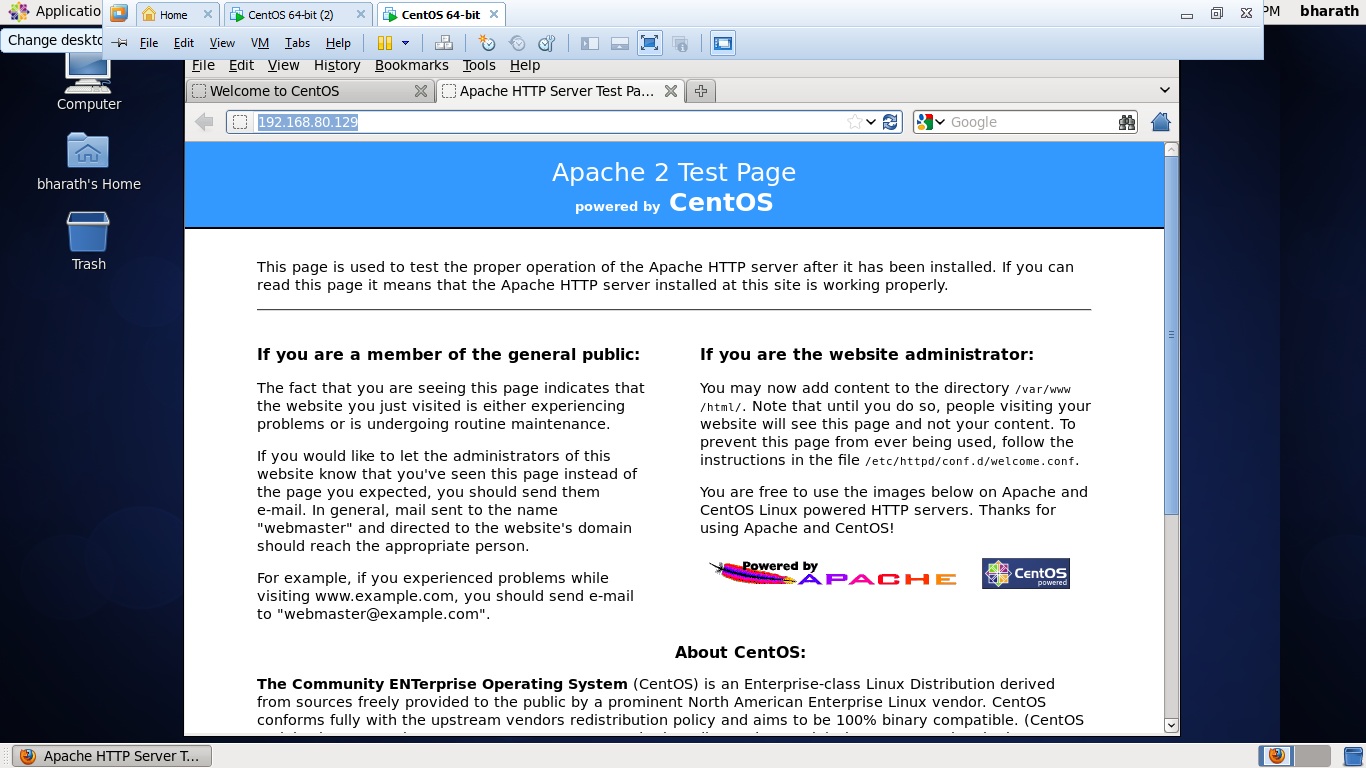
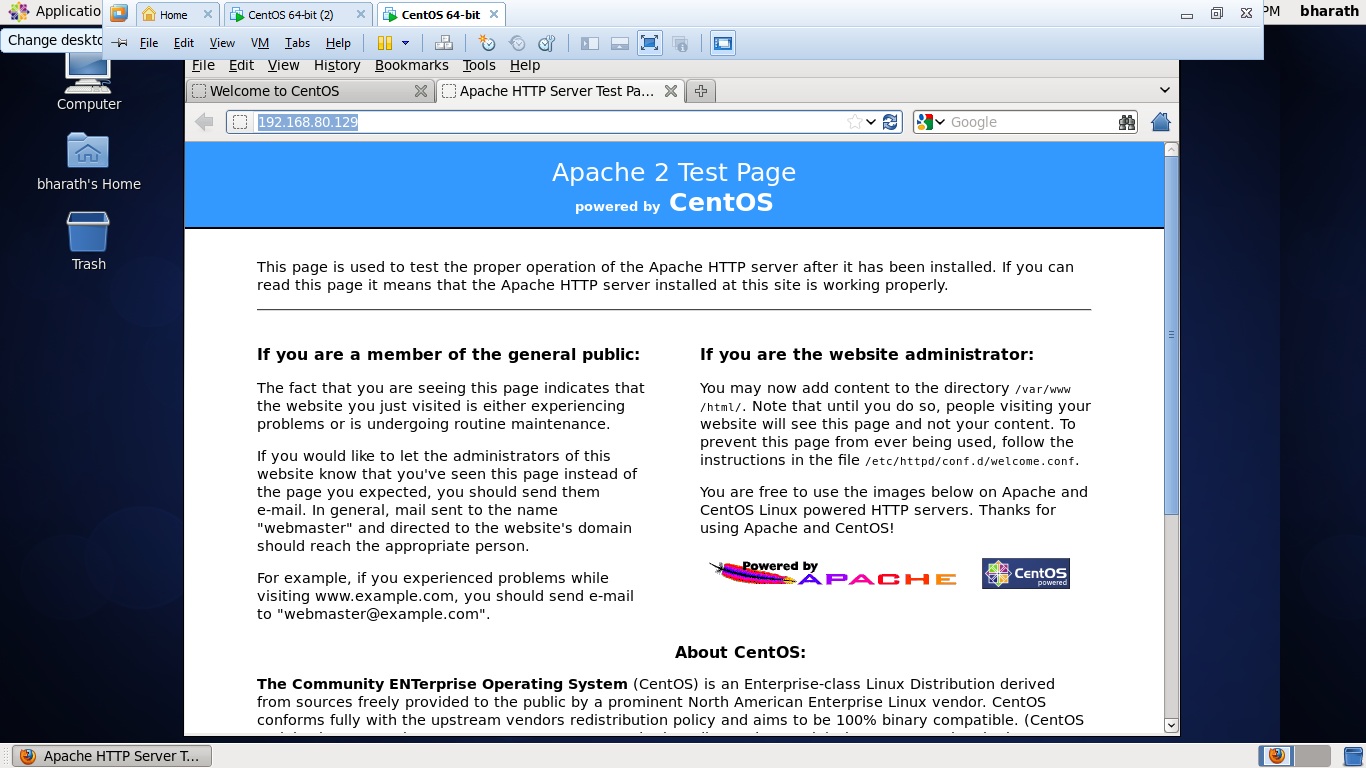
Actually the linux box running inside workstation. it won't be appear to web at all. I even edited the my hosts(windows7) machines hosts file as well. in my host machine in the browser itself it's not working as belwo..
Actually the linux box running inside workstation. it won't be appear to web at all. I even edited the my hosts(windows7) machines hosts file as well. in my host machine in the browser itself it's not working as belwo..
[root@bharathkumar ~]# cat /etc/hosts
127.0.0.1 localhost localhost.localdomain localhost4 localhost4.localdomain4
::1 localhost localhost.localdomain localhost6 localhost6.localdomain6
192.168.80.129 bharathkumar.test.com
[root@bharathkumar ~]#
Author: BharathKumarRaju DasaraRaju replied at 2024-07-26 17:43:09
Hi duncanb7,
[root@bharathkumar ~]# wget -U firefox http://bharathkumar.test.com
--2014-07-26 17:42:23-- http://bharathkumar.test.com/
Resolving bharathkumar.test.com... 192.168.80.129
Connecting to bharathkumar.test.com|192.168.80.129|:80... connected.
HTTP request sent, awaiting response... 403 Forbidden
2014-07-26 17:42:23 ERROR 403: Forbidden.
[root@bharathkumar ~]# wget -U "Mozilla/5.0 (Windows; U; Windows NT 5.1; de; rv:1.9.2.3) Gecko/20100401 Firefox/3.6.3" http://bharathkumar.test.com
--2014-07-26 17:42:27-- http://bharathkumar.test.com/
Resolving bharathkumar.test.com... 192.168.80.129
Connecting to bharathkumar.test.com|192.168.80.129|:80... connected.
HTTP request sent, awaiting response... 403 Forbidden
2014-07-26 17:42:27 ERROR 403: Forbidden.
[root@bharathkumar ~]# wget -U firefox http://bharathkumar.test.com
--2014-07-26 17:42:23-- http://bharathkumar.test.com/
Resolving bharathkumar.test.com... 192.168.80.129
Connecting to bharathkumar.test.com|192.168.80.129|:80... connected.
HTTP request sent, awaiting response... 403 Forbidden
2014-07-26 17:42:23 ERROR 403: Forbidden.
[root@bharathkumar ~]# wget -U "Mozilla/5.0 (Windows; U; Windows NT 5.1; de; rv:1.9.2.3) Gecko/20100401 Firefox/3.6.3" http://bharathkumar.test.com
--2014-07-26 17:42:27-- http://bharathkumar.test.com/
Resolving bharathkumar.test.com... 192.168.80.129
Connecting to bharathkumar.test.com|192.168.80.129|:80... connected.
HTTP request sent, awaiting response... 403 Forbidden
2014-07-26 17:42:27 ERROR 403: Forbidden.
Expert: Gary replied at 2024-07-26 17:42:29
Where is http://192.168.80.129/ coming from? That looks like a local/private IP address
Are you using your hosts file to redirect addresses?
Are you using your hosts file to redirect addresses?
Author: BharathKumarRaju DasaraRaju replied at 2024-07-26 17:35:02
[root@bharathkumar ~]# ifconfig -a
eth0 Link encap:Ethernet HWaddr 00:0C:29:F3:55:33
inet addr:192.168.80.129 Bcast:192.168.80.255 Mask:255.255.255.0
inet6 addr: fe80::20c:29ff:fef3:5533/64 Scope:Link
UP BROADCAST RUNNING MULTICAST MTU:1500 Metric:1
RX packets:344 errors:0 dropped:0 overruns:0 frame:0
TX packets:276 errors:0 dropped:0 overruns:0 carrier:0
collisions:0 txqueuelen:1000
RX bytes:32709 (31.9 KiB) TX bytes:33792 (33.0 KiB)
lo Link encap:Local Loopback
inet addr:127.0.0.1 Mask:255.0.0.0
inet6 addr: ::1/128 Scope:Host
UP LOOPBACK RUNNING MTU:16436 Metric:1
RX packets:6630 errors:0 dropped:0 overruns:0 frame:0
TX packets:6630 errors:0 dropped:0 overruns:0 carrier:0
collisions:0 txqueuelen:0
RX bytes:2011380 (1.9 MiB) TX bytes:2011380 (1.9 MiB)
[root@bharathkumar ~]#
eth0 Link encap:Ethernet HWaddr 00:0C:29:F3:55:33
inet addr:192.168.80.129 Bcast:192.168.80.255 Mask:255.255.255.0
inet6 addr: fe80::20c:29ff:fef3:5533/64 Scope:Link
UP BROADCAST RUNNING MULTICAST MTU:1500 Metric:1
RX packets:344 errors:0 dropped:0 overruns:0 frame:0
TX packets:276 errors:0 dropped:0 overruns:0 carrier:0
collisions:0 txqueuelen:1000
RX bytes:32709 (31.9 KiB) TX bytes:33792 (33.0 KiB)
lo Link encap:Local Loopback
inet addr:127.0.0.1 Mask:255.0.0.0
inet6 addr: ::1/128 Scope:Host
UP LOOPBACK RUNNING MTU:16436 Metric:1
RX packets:6630 errors:0 dropped:0 overruns:0 frame:0
TX packets:6630 errors:0 dropped:0 overruns:0 carrier:0
collisions:0 txqueuelen:0
RX bytes:2011380 (1.9 MiB) TX bytes:2011380 (1.9 MiB)
[root@bharathkumar ~]#
Expert: Gary replied at 2024-07-26 17:29:19
Actually no this might not be a DNS propogation problem, I can connect to the IP but it is then redirecting. Unless there was a wrong IP or something set up initially
Is test.com your site?
What is your IP supposed to be?
50.23.225.49 and 208.64.121.188 both resolve to test.com
Is test.com your site?
What is your IP supposed to be?
50.23.225.49 and 208.64.121.188 both resolve to test.com
Expert: duncanb7 replied at 2024-07-26 17:26:54
Dear Author,
You can try this simple one command as follows,
You can try this simple one command as follows,
if not working, provide more information for user-agent
wget -U "Mozilla/5.0 (Windows; U; Windows NT 5.1; de; rv:1.9.2.3) Gecko/20100401 Firefox/3.6.3" http://bharathkumar.test.com 1:
Hope understand your question completely.If not , pls pt out.
Duncan
Assisted Solution
Expert: Gary replied at 2024-07-26 17:24:31
100 points EXCELLENT
Give it 24 hours and report back
Your browser could be using a different DNS than your terminal.
Your browser could be using a different DNS than your terminal.
Author: BharathKumarRaju DasaraRaju replied at 2024-07-26 17:23:47
Hi Gary,
You are right ... might be your DNS propogation
You are right ... might be your DNS propogation
Expert: Gary replied at 2024-07-26 17:19:20
In my browser I get redirected as well
This may just be a case of waiting for DNS propogation if this url is new.
This may just be a case of waiting for DNS propogation if this url is new.
Author: BharathKumarRaju DasaraRaju replied at 2024-07-26 17:17:23
Expert: Gary replied at 2024-07-26 17:14:37
This is the response I get
--2014-07-27 01:14:12-- http://bharathkumar.test.com/Resolving bharathkumar.test.com (bharathkumar.test.com)... 50.23.225.49Connecting to bharathkumar.test.com (bharathkumar.test.com)|50.23.225.49|:80... connected.HTTP request sent, awaiting response... 301 Moved PermanentlyLocation: http://www.test.com/ [following]--2014-07-27 01:14:12-- http://www.test.com/Resolving www.test.com (www.test.com)... 208.64.121.188Connecting to www.test.com (www.test.com)|208.64.121.188|:80... connected.HTTP request sent, awaiting response... 200 OKLength: 15174 (15K) [text/html]Saving to: ‘index.html’100%[=================================================>] 15,174 59.1KB/s in 0.3s2014-07-27 01:14:14 (59.1 KB/s) - ‘index.html’ saved [15174/15174] 1:2:3:4:5:6:7:8:9:10:11:12:13:14:15:
It's redirecting to www.test.com
Author: BharathKumarRaju DasaraRaju replied at 2024-07-26 17:01:47
Hi Gary,
Correct URL only... iam able to see the http test page with that URL in browser ....
[root@bharathkumar ~]# wget 192.168.80.129
--2014-07-26 16:52:18-- http://192.168.80.129/
Connecting to 192.168.80.129:80... connected.
HTTP request sent, awaiting response... 403 Forbidden
2014-07-26 16:52:18 ERROR 403: Forbidden.
[root@bharathkumar ~]# hostname
bharathkumar.test.com
[root@bharathkumar ~]#
Correct URL only... iam able to see the http test page with that URL in browser ....
[root@bharathkumar ~]# wget 192.168.80.129
--2014-07-26 16:52:18-- http://192.168.80.129/
Connecting to 192.168.80.129:80... connected.
HTTP request sent, awaiting response... 403 Forbidden
2014-07-26 16:52:18 ERROR 403: Forbidden.
[root@bharathkumar ~]# hostname
bharathkumar.test.com
[root@bharathkumar ~]#
Expert: Gary replied at 2024-07-26 16:48:55
Is that a real URL? Else what is the real url
Because I just ran it and it went through fine
Because I just ran it and it went through fine
Author: BharathKumarRaju DasaraRaju replied at 2024-07-26 16:40:31
Hi Gary,
Thank you so much for your quick answer
But unfortunately isn't working....
[root@bharathkumar conf.d]# wget -U Mozilla/5.0 http://bharathkumar.test.com
--2014-07-26 16:39:36-- http://bharathkumar.test.com/
Resolving bharathkumar.test.com... 192.168.80.129
Connecting to bharathkumar.test.com|192.168.80.129|:80... connected.
HTTP request sent, awaiting response... 403 Forbidden
2014-07-26 16:39:36 ERROR 403: Forbidden.
[root@bharathkumar conf.d]#
Thank you so much for your quick answer
But unfortunately isn't working....
[root@bharathkumar conf.d]# wget -U Mozilla/5.0 http://bharathkumar.test.com
--2014-07-26 16:39:36-- http://bharathkumar.test.com/
Resolving bharathkumar.test.com... 192.168.80.129
Connecting to bharathkumar.test.com|192.168.80.129|:80... connected.
HTTP request sent, awaiting response... 403 Forbidden
2014-07-26 16:39:36 ERROR 403: Forbidden.
[root@bharathkumar conf.d]#
Expert: Gary replied at 2024-07-26 16:37:16
If you run this does it work
wget -U Mozilla/5.0 http://bharathkumar.test.com
If that works the server/site is rejecting unknown user agents (aka browsers)
wget -U Mozilla/5.0 http://bharathkumar.test.com
If that works the server/site is rejecting unknown user agents (aka browsers)
