


Ask Question Forum:
Model Library:2025-02-08 Updated:A.I. model is online for auto reply question page
C
O
M
P
U
T
E
R
2
8
Show
#
ASK
RECENT
←
- Underline
- Bold
- Italic
- Indent
- Step
- Bullet
- Quote
- Cut
- Copy
- Paste
- Table
- Spelling
- Find & Replace
- Undo
- Redo
- Link
- Attach
- Clear
- Code
Below area will not be traslated by Google,you can input code or other languages
Hint:If find spelling error, You need to correct it,1 by 1 or ignore it (code area won't be checked).
X-position of the mouse cursor
Y-position of the mouse cursor
Y-position of the mouse cursor
Testcursor
caretPos
Attachment:===
Asked by fparvini
at 2024-07-25 16:40:11
Point:500 Replies:7 POST_ID:829110USER_ID:10
Topic:
Microsoft Excel Spreadsheet Software;;VB Script
Hi ,
I have an excel sheet file with full of VB codes, need to give it to client, but don't want them to see all my codes.
At the same time, want them to be able to run.
Please advise
I have an excel sheet file with full of VB codes, need to give it to client, but don't want them to see all my codes.
At the same time, want them to be able to run.
Please advise
Expert: James Elliott replied at 2024-08-20 22:24:34
Not sure that was deserved.
Accepted Solution
Expert: James Elliott replied at 2024-07-28 12:27:19
500 points EXCELLENT
Very true
Expert: Patrick Matthews replied at 2024-07-28 11:05:34
Do note, though, that sharing the workbook is itself inherently dangerous; having multiple people in the file at once creates a huge risk of file corruption. It is only a slight exaggeration to say that there are only two types of shared workbooks: those that are corrupt, and those that soon will be :)
Expert: James Elliott replied at 2024-07-27 11:33:21
Share & protect the workbook is probaly the best of a bad bunce of options. That makes the VB project unviewable, and it's a bit harder to crack.
Rgds
Jell
Rgds
Jell
Expert: ProdOps replied at 2024-07-26 11:48:51
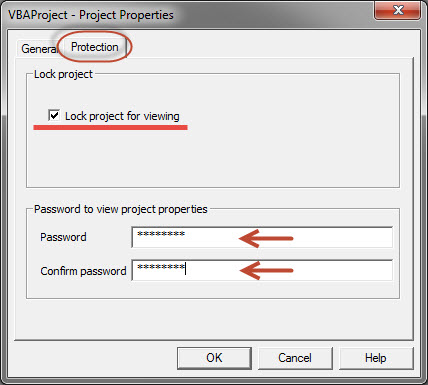
Screen captures showing the steps to lock the VBA code for viewing and editing. Select the Protection tab in the VBAProperties Dialog check box, click the box to prevent viewing and enter a password required to open the project. As Patrick noted above, this can be hacked very easily with tools if someone really wants your code. If the requirement is to prevent your user community from accidentally changing the code, this works very well.

Expert: duncanb7 replied at 2024-07-25 20:25:06
Take a look this for 3 method to secure your VBA
http://www.wikihow.com/Protect-VBA-Code
If method-2 is not safe enough , method-3, using Add-in that saved in other workbook will be
option
Duncan
http://www.wikihow.com/Protect-VBA-Code
If method-2 is not safe enough , method-3, using Add-in that saved in other workbook will be
option
Duncan
Expert: Patrick Matthews replied at 2024-07-25 17:16:38
In the VBA Editor you can lock the VBA project with a password. Keep in mind, though, that this password is inherently insecure, and can be cracked very, very easily using readily available, inexpensive hacking tools.
