


Ask Question Forum:
Model Library:2025-02-08 Updated:A.I. model is online for auto reply question page
C
O
M
P
U
T
E
R
2
8
Show
#
ASK
RECENT
←
- Underline
- Bold
- Italic
- Indent
- Step
- Bullet
- Quote
- Cut
- Copy
- Paste
- Table
- Spelling
- Find & Replace
- Undo
- Redo
- Link
- Attach
- Clear
- Code
Below area will not be traslated by Google,you can input code or other languages
Hint:If find spelling error, You need to correct it,1 by 1 or ignore it (code area won't be checked).
X-position of the mouse cursor
Y-position of the mouse cursor
Y-position of the mouse cursor
Testcursor
caretPos
Attachment:===
Asked by fh_freese
at 2024-07-17 12:04:53
 Modify
Point:500 Replies:19 POST_ID:829010USER_ID:11849
Topic:
Microsoft Excel Spreadsheet Software;;
Folks,
This is the code I'm using
This is the code I'm using
Sub InsertNewYearConsolidated() Dim ws As Worksheet, rw As Long Set ws = Worksheets("Consolidated") ws.Select 'Insert 12 rows above Totals and the spacer row rw = ws.Range("A:A").Find("Totals").Row ws.Rows(((rw - 1) & ":" & (rw + 10))).Insert Shift:=xlDown 'copy the format from the first 12 rows (6 to 17) ws.Range("A6:U17").Copy ws.Range("A" & (rw - 1)).Select Selection.PasteSpecial Paste:=xlPasteFormats Ws.Range(“A6:A17â€).Copy Selection.PasteSpecial Paste:=xlPasteValues Application.CutCopyMode = False Range("A1").SelectEnd Sub 1:2:3:4:5:6:7:8:9:10:11:12:13:14:15:16:17:18:19:
In adding lines 14 and 15 I'm getting this:

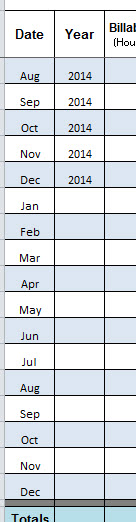
Not exactly what I am needing which is this:
Author: fh_freese replied at 2024-07-18 13:52:06
My pleasure. You have a great day also.
Expert: duncanb7 replied at 2024-07-18 13:45:37
Thanks for your points
Have a nice day
Duncan
Have a nice day
Duncan
Author: fh_freese replied at 2024-07-18 12:37:24
Thanks Duncan!
Author: fh_freese replied at 2024-07-18 12:34:48
Duncan work on this and there is a value. I'm going to give him the points
Author: fh_freese replied at 2024-07-17 15:04:08
Duncan,
You are good man and dedicated to helping us. I'll have more posts of this problem for sure - my client is taking me to on a Star Trek adventure - To boldly go....
Again,
Accept my grateful thanks and appreciation
Frank
You are good man and dedicated to helping us. I'll have more posts of this problem for sure - my client is taking me to on a Star Trek adventure - To boldly go....
Again,
Accept my grateful thanks and appreciation
Frank
Author: fh_freese replied at 2024-07-17 14:59:55
Duncan,
I tried everything you posted and displayed the results. Yes, you did add the months but the rest of the formatting was something I could not use. I closed this question when I discovered that all the new code that was needed was:
Range("A6:A17").Select
Selection.Copy
Range("A18:A29").Select
Right before:
Range("A1").Select
this last line of code I had.
I personally don't collect points and if there was some way to give you partial I truly would
I tried everything you posted and displayed the results. Yes, you did add the months but the rest of the formatting was something I could not use. I closed this question when I discovered that all the new code that was needed was:
Range("A6:A17").Select
Selection.Copy
Range("A18:A29").Select
Right before:
Range("A1").Select
this last line of code I had.
I personally don't collect points and if there was some way to give you partial I truly would
Expert: duncanb7 replied at 2024-07-17 14:56:02
I'd also spent a lot time to read your question in detail and made the code even that is not matched to your need finally.
Anyway, glad to see you have solved your problem
Have a nice day
Duncan
Anyway, glad to see you have solved your problem
Have a nice day
Duncan
Author: fh_freese replied at 2024-07-17 14:52:21
I've requested that this question be closed as follows:
Accepted answer: 0 points for fh_freese's comment #a40203317
for the following reason:
Duncan left me with the impression he had offered a solution, which unfortunately, was not the case. So I spent more time with the problem and saw how to do it myself.
I simply added this snippet:
Range("A6:A17").Select
Selection.Copy
Range("A18:A29").Select
problem solved
Accepted answer: 0 points for fh_freese's comment #a40203317
for the following reason:
Duncan left me with the impression he had offered a solution, which unfortunately, was not the case. So I spent more time with the problem and saw how to do it myself.
I simply added this snippet:
Range("A6:A17").Select
Selection.Copy
Range("A18:A29").Select
problem solved
Accepted Solution
Expert: duncanb7 replied at 2024-07-17 14:51:20
500 points EXCELLENT
I have already done the code for the image at http://filedb.experts-exchange.com/incoming/2014/07_w29/861307/correctfill.jpg
Is it right ?
Duncan
Is it right ?
Duncan
Author: fh_freese replied at 2024-07-17 14:48:15
Actually, I was able to resolve this myself today. It truly was not as difficult of a fix that I though.
Thanks for your support
Thanks for your support
Author: fh_freese replied at 2024-07-17 14:07:23
I'm not sure I understand your response. Are you saying that you have provided a solution?
thanks
Frank
thanks
Frank
Expert: duncanb7 replied at 2024-07-17 14:03:07
based on my attached example to solve the rest of your issue
have a nice day
Duncan
have a nice day
Duncan
Author: fh_freese replied at 2024-07-17 14:02:01
Duncan,
This code maintains the row and column formatting needed.
This code maintains the row and column formatting needed.
Sub InsertNewYearConsolidated() Dim ws As Worksheet, rw As Long Set ws = Worksheets("Consolidated") ws.Select 'Insert 12 rows above Totals and the spacer row rw = ws.Range("A:A").Find("Totals").Row ws.Rows(((rw - 1) & ":" & (rw + 10))).Insert Shift:=xlDown 'copy the format from the first 12 rows (6 to 17) ws.Range("A6:U17").Copy ws.Range("A" & (rw - 1)).Select Selection.PasteSpecial Paste:=xlPasteFormats Application.CutCopyMode = False Range("A1").SelectEnd Sub 1:2:3:4:5:6:7:8:9:10:11:12:13:14:15:16:17:
From that I get this

The above is correct.
What I am getting from junk2.xlsm looks like this:

You give me the months Jan - Dec but not the formatting. When I'm adding to the worksheet I am also adding the months Jan - Dec in A18:A29. That's what's missing from the code snippet provided above --- adding Jan - Dec is my objective. I'm having some issues adding the year but I may post another question if I need to..
Expert: duncanb7 replied at 2024-07-17 13:31:19
Please see the attached file, and you delete the rows below row17, and then re-run marco
Duncan
Duncan
Expert: duncanb7 replied at 2024-07-17 13:16:53
Please try this code
Duncan
Duncan
Sub InsertNewYearConsolidated() Dim ws As Worksheet, rw As Long Set ws = Worksheets("Consolidated") ws.Select 'Insert 12 rows above Totals and the spacer row rw = ws.Range("A:A").Find("Totals").Row ws.Rows(((rw - 1) & ":" & (rw + 10))).Insert Shift:=xlDown ' ws.Range("B" & (rw - 1) & ":" & "B" & (rw + 10)).NumberFormat = "dd/mm/yyyy" 'copy the format from the first 12 rows (6 to 17) ' ws.Range("A6:U17").Copy ws.Range("A" & (rw - 1) & ":" & "A" & (rw + 10)).Select ws.Range("A6:A17").Copy Selection.PasteSpecial Paste:=xlPasteValues Application.CutCopyMode = False Range("A1").SelectEnd Sub 1:2:3:4:5:6:7:8:9:10:11:12:13:14:15:16:17:18:19:20:
Expert: duncanb7 replied at 2024-07-17 12:44:22
What is the result you want on Consolidated sheet after macro running. Could you put the data into sheet and send us in other file ?
Duncan
Duncan
Expert: duncanb7 replied at 2024-07-17 12:30:23
Sorry, ignore the previous writing, I could open it now and run it
Duncan
Duncan
Author: fh_freese replied at 2024-07-17 12:22:59
Sure no problem. It is attached; On the Cost Allocation Main worksheet you will find a command button with the macro
named InsertNew YearConsolidated. I added to the original code
named InsertNew YearConsolidated. I added to the original code
The rest of the code is correct.
Expert: duncanb7 replied at 2024-07-17 12:10:50
Could you send us your Excel workbook with that macro so that we can run it
at our side that assist to solve the issue quickly
Duncan
at our side that assist to solve the issue quickly
Duncan
