


Ask Question Forum:
Model Library:2025-02-08 Updated:A.I. model is online for auto reply question page
C
O
M
P
U
T
E
R
2
8
Show
#
ASK
RECENT
←
- Underline
- Bold
- Italic
- Indent
- Step
- Bullet
- Quote
- Cut
- Copy
- Paste
- Table
- Spelling
- Find & Replace
- Undo
- Redo
- Link
- Attach
- Clear
- Code
Below area will not be traslated by Google,you can input code or other languages
Hint:If find spelling error, You need to correct it,1 by 1 or ignore it (code area won't be checked).
X-position of the mouse cursor
Y-position of the mouse cursor
Y-position of the mouse cursor
Testcursor
caretPos
Attachment:===
Asked by Michael_Leng
at 2024-07-17 02:12:36
 Modify
Point:500 Replies:8 POST_ID:829001USER_ID:11899
Topic:
Windows XP Operating System;Windows 2003 Server;Windows 7
Hi All Experts,
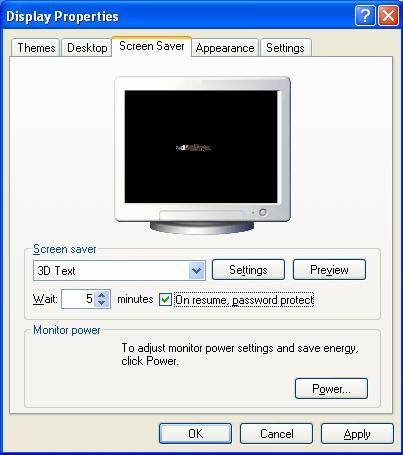
As required by our policy, all end user need to have screen saver password protect on resume and the policy require only 5minutes to lock with screen saver password.
no end user can adjust the time from 5 minutes to 10 minutes. so how to set this restriction, as normally end user can adjust the time by them self.
our client are mostly winXP Pro and Win 7 with DC as Win2k3.
thanks
As required by our policy, all end user need to have screen saver password protect on resume and the policy require only 5minutes to lock with screen saver password.
no end user can adjust the time from 5 minutes to 10 minutes. so how to set this restriction, as normally end user can adjust the time by them self.
our client are mostly winXP Pro and Win 7 with DC as Win2k3.
thanks
Accepted Solution
Expert: Iain MacMillan (IainNIX) replied at 2024-07-28 05:25:28
100 points EXCELLENT
as David said, create a new policy for the screensaver settings (we also do our wallpaper this way too).
once you saver the file on the DC, you need to have OU groups setup with the COMPUTER accounts sorted by however you like (we use location and OS type). You can then use the Group Policy Management console to link the new policy onto the required OU groups. Once thats done your systems should update at some point during the day depending on your update setting, or do GPUPDATE /FORCE from any system command line.
GPMC can be installed on any 2003/2008 server so you can use it on your DC. I recommend you add the Admin tools to your own system so you can manage domain admin tasks on that rather than keep RDP'ing on the server.
http://www.microsoft.com/en-gb/download/details.aspx?id=21895 - GPMC download.
http://windows.microsoft.com/en-gb/windows7/group-policy-management-for-it-pros - handy hints for GP work.
once you saver the file on the DC, you need to have OU groups setup with the COMPUTER accounts sorted by however you like (we use location and OS type). You can then use the Group Policy Management console to link the new policy onto the required OU groups. Once thats done your systems should update at some point during the day depending on your update setting, or do GPUPDATE /FORCE from any system command line.
GPMC can be installed on any 2003/2008 server so you can use it on your DC. I recommend you add the Admin tools to your own system so you can manage domain admin tasks on that rather than keep RDP'ing on the server.
http://www.microsoft.com/en-gb/download/details.aspx?id=21895 - GPMC download.
http://windows.microsoft.com/en-gb/windows7/group-policy-management-for-it-pros - handy hints for GP work.
Assisted Solution
Expert: Mahesh replied at 2024-07-26 00:44:20
100 points EXCELLENT
If you apply screen saver policy in default domain controller policy, it will applied to only DC servers which you don't want, right ?
Default domain controller policy applies to domain controllers only
If you apply it to domain level, still it will apply to all DC servers and all member servers as well in addition to all computers, this is also you don't want right?
Because default domain policy applies to all resources in domain
Hence create separate policy as stated above and apply it to OU that containing your AD users so that policy will apply to only those desktop laptop machines
Default domain controller policy applies to domain controllers only
If you apply it to domain level, still it will apply to all DC servers and all member servers as well in addition to all computers, this is also you don't want right?
Because default domain policy applies to all resources in domain
Hence create separate policy as stated above and apply it to OU that containing your AD users so that policy will apply to only those desktop laptop machines
Assisted Solution
Expert: David Johnson, CD, MVP replied at 2024-07-26 00:31:54
100 points EXCELLENT
create a new policy name it 'screen saver policy' and enable it for authenticated users.
Expert: eenookami replied at 2024-07-25 20:10:08
Michael_Leng,
A message has been sent to some additional experts asking them to review your question. We will check back again to see if you are getting the help you need.
Please do not respond to this comment; we will be monitoring your question for activity from the Experts.
Thank you for using Experts Exchange,
eenookami
CS Moderator
http://www.experts-exchange.com/R_32703.html
A message has been sent to some additional experts asking them to review your question. We will check back again to see if you are getting the help you need.
Please do not respond to this comment; we will be monitoring your question for activity from the Experts.
Thank you for using Experts Exchange,
eenookami
CS Moderator
http://www.experts-exchange.com/R_32703.html
Author: Michael_Leng replied at 2024-07-17 19:02:55
Author: Michael_Leng replied at 2024-07-17 18:55:48
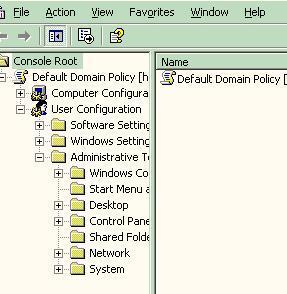
I just use the Group policy editor by add remove snap in in MMC and choose the Group policy object editor,
so should I applied for Default Domain policy or Default Domain controller policy.
Our Win2003 act as DC and Exchange server
so should I applied for Default Domain policy or Default Domain controller policy.
Our Win2003 act as DC and Exchange server
Assisted Solution
Expert: duncanb7 replied at 2024-07-17 03:57:43
100 points EXCELLENT
You can use option-2 registry or option-3 gp editor with adminstrator priviledge
from the following link instructions
http://www.sevenforums.com/tutorials/15322-screen-saver-password-protection-enable-disable.html
Hope understand your question.If not, please pt it out
Duncan
from the following link instructions
http://www.sevenforums.com/tutorials/15322-screen-saver-password-protection-enable-disable.html
Hope understand your question.If not, please pt it out
Duncan
Assisted Solution
Expert: Haresh Nikumbh replied at 2024-07-17 03:30:26
100 points EXCELLENT
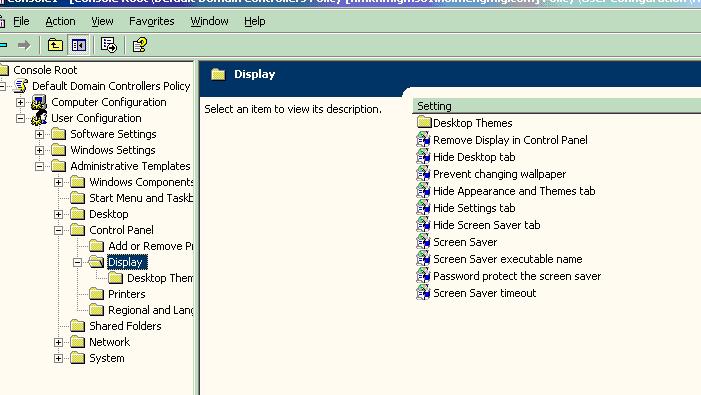
In Win2003 domain you can set these using the group policy editor, look under User Configuration -> Administrative Templates -> Control Panel -> Display.
There are options to set the timeouts, password options and even the executable that is run.
(If you don't have the group policy editor on your system, go to download.microsoft.com and search for "Group Policy Editor".)
There are options to set the timeouts, password options and even the executable that is run.
(If you don't have the group policy editor on your system, go to download.microsoft.com and search for "Group Policy Editor".)
