


Ask Question Forum:
Model Library:2025-02-08 Updated:A.I. model is online for auto reply question page
C
O
M
P
U
T
E
R
2
8
Show
#
ASK
RECENT
←
- Underline
- Bold
- Italic
- Indent
- Step
- Bullet
- Quote
- Cut
- Copy
- Paste
- Table
- Spelling
- Find & Replace
- Undo
- Redo
- Link
- Attach
- Clear
- Code
Below area will not be traslated by Google,you can input code or other languages
Hint:If find spelling error, You need to correct it,1 by 1 or ignore it (code area won't be checked).
X-position of the mouse cursor
Y-position of the mouse cursor
Y-position of the mouse cursor
Testcursor
caretPos
Attachment:===
Asked by lionelmm
at 2024-07-12 07:16:59
 Modify
Point:500 Replies:30 POST_ID:828963USER_ID:11758
Topic:
Web Browsers;Microsoft Operating Systems;Windows 7
Whenever I go to a MS SUPPORT site (not community or technet or general MS sites, just support) like this one http://support.microsoft.com/kb/2917500 I get chinese looking characters (see screenshot). This is in firefox--if I use IE on the same PC it displays in English for the exact same link. Saw online that Real player may be a cause so I removed real player but issue persists. have also disabled and/or removed most of my Firefox add-ons and extensions but that did not help.
Attachment:EE-Firefox-in-Chinese.jpgEE-IE-in-English.jpg
Expert: BillDL replied at 2024-08-18 03:03:04
Thank you lionelmm
Author: lionelmm replied at 2024-08-18 02:15:45
Thanks for all your time and efforts--appreciate it.
Expert: aadih replied at 2024-08-11 06:35:55
Great. :-)
Accepted Solution
Author: lionelmm replied at 2024-08-11 04:28:29
OK I have it fixed--I re-did all most of the recommendations--I uninstalled firefox. I had a version 3.6 that I installed. I then checked the language settings, I then checked all the add-ons and extensions (there were very few but disabled some), then I closed firefox and went to the users folder and deleted the mozillafirefoxprofile directory, started firefox back up and re-ran delete history--went to MS support and now I see English everywhere so thanks for all the suggestions--they helped in total--thank you.
Expert: BillDL replied at 2024-08-11 01:59:59
I'm sorry lionelmm. I am as stumped as you are at the moment. I have tried to replicate the issue by changing all manner of settings and then visiting the same page, but I can't.
Author: lionelmm replied at 2024-08-10 18:32:58
I did try removing all history when this first started and then again about 2 weeks ago-no luck
Assisted Solution
Expert: Rob Jurd replied at 2024-08-10 16:33:02
83 points EXCELLENT
Hi Lionelmm,
So you can confirm that you've deleted all history and cookies (on the privacy tab)?
Kb article on how to do that as you are usually directed to localised versions if the website because if this content.
https://support.mozilla.org/en-US/kb/remove-recent-browsing-search-and-download-history
So you can confirm that you've deleted all history and cookies (on the privacy tab)?
Kb article on how to do that as you are usually directed to localised versions if the website because if this content.
https://support.mozilla.org/en-US/kb/remove-recent-browsing-search-and-download-history
Author: lionelmm replied at 2024-08-10 09:52:35
I did disable all ad-on and extensions--where possible I removed them. I did try removing all history when this first started and then again about 2 weeks ago. See picture--my setting are exactly the same as yours
Assisted Solution
Expert: BillDL replied at 2024-08-10 04:52:12
83 points EXCELLENT
I'm sorry, I was looking at duncanb7's profile in error when I saw the yahoo.hk email address.
Something is obviously badly screwed up if you are still seeing loads of Chinese after loading the English page, eg. http://support.microsoft.com/kb/2917500/en-us
How do your settings compare with mine in this dialog:
Tools > Options > Content tab > Fonts and Colors section:
Default Font = Times New Roman size 16
Click "Advanced" button:
Something is obviously badly screwed up if you are still seeing loads of Chinese after loading the English page, eg. http://support.microsoft.com/kb/2917500/en-us
How do your settings compare with mine in this dialog:
Tools > Options > Content tab > Fonts and Colors section:
Default Font = Times New Roman size 16
Click "Advanced" button:

Try temporarily disabling all your Add-Ons, restart Firefox, and test.
Tools menu > Add-Ons > Extensions > use the "Disable" buttons.
I assume you have tried deleting your browser cache?
History menu > Clear Recent History > Time Range = "Everything", tick all boxes > Clear Now.
Author: lionelmm replied at 2024-08-10 04:25:36
I am in Tampa, FL and my ISP is based in ST. Pete FL (Brighthouse). When I look up my IP it shows it is in Tampa; my MS email address is at least 20 years old--it is a MSN account and I have never had this problem. PLUS when I use Internet Explorer I do not have this issue--same PC, same ISP, everything the same except when using Firefox I get Chinese. I used the one suggestion you gave and now I can at least see English in the text but there is still lots of Chinese characters on the page. Further this is a fairly new development, about 2 to 3 months now--I think after a Firefox update. I did try to go back to an earlier version but that did not help.
Expert: BillDL replied at 2024-08-10 03:28:11
Great. :-)
Assisted Solution
Expert: BillDL replied at 2024-08-10 03:24:02
83 points EXCELLENT
You have a Hong Kong email address, so it is fair to assume that you live there and use a Hong Kong-based ISP. The Microsoft site will be checking your IP Address and determining that you are in Hong Kong, and that it would therefore be normal for you to be shown in Simplified Chinese (language code ZH-CN).
Once you are on a page in a particular language translation most or all the links will be to pages or files in that language. You will see that the links to the security advisory is:
http://technet.microsoft.com/zh-cn/security/advisory/2916652
and the download "Rvkroots.exe" link is:
http://www.microsoft.com/zh-cn/download/details.aspx?id=41542
The quick, but probably just temporary, workaround is as follows from that page:
Once you are on a page in a particular language translation most or all the links will be to pages or files in that language. You will see that the links to the security advisory is:
http://technet.microsoft.com/zh-cn/security/advisory/2916652
and the download "Rvkroots.exe" link is:
http://www.microsoft.com/zh-cn/download/details.aspx?id=41542
The quick, but probably just temporary, workaround is as follows from that page:


The URL in the Address Bar should now be showing:
http://support.microsoft.com/kb/2917500/en-us
and all links thereafter should assume that you want the English versions.
If you had arrived at the same page in some other language and had changed it to ZH-CN

the URL in the Address Bar would have been:
http://support.microsoft.com/kb/2917500/zh-cn
Check out the following setting to see whether the Microsoft Support site loads the English pages once changed:
FF-Tools-Options-Content-01.jpg 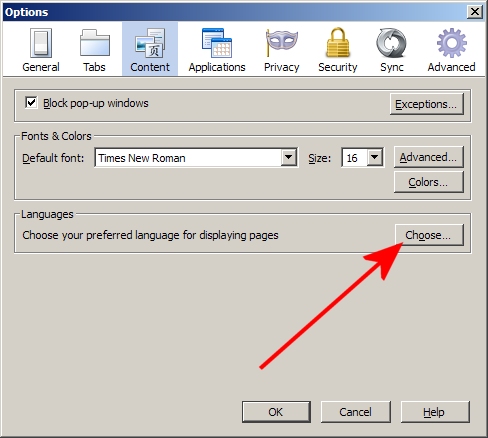
- 84 KB
- Firefox: Tools menu > Options > Content tab. Languages section > Click "Choose"
FF-Tools-Options-Content-02.jpg 
- 51 KB
- Delete unwanted languages and set your preferred one at the top
For those people who aren't seeing the Menu Bar in Firefox, and therefore aren't seeing the "Tools" menu, follow these steps to show it:
Expert: eenookami replied at 2024-08-09 05:19:40
I'm objecting on behalf of the author
eenookami
CS Moderator
eenookami
CS Moderator
Expert: LeeTutor replied at 2024-08-08 13:42:03
Great. :-)
Expert: LeeTutor replied at 2024-08-08 13:42:03
Great. :-)
Author: lionelmm replied at 2024-07-13 10:32:45
thanks but I had already checked that settings (see picture)
Assisted Solution
Expert: duncanb7 replied at 2024-07-12 19:51:36
83 points EXCELLENT
you might put Chinese Lanuage stuff at
Tools->options->Contents->Choose Lanuage(similar to the following image link)
Remove other Lanauge besides English or the language you want
and restart FF
https://support.mozilla.org/en-US/kb/settings-fonts-languages-and-pop-ups#w_content-settings
Tools->options->Contents->Choose Lanuage(similar to the following image link)
Remove other Lanauge besides English or the language you want
and restart FF
https://support.mozilla.org/en-US/kb/settings-fonts-languages-and-pop-ups#w_content-settings
Author: lionelmm replied at 2024-07-12 11:18:48
I have already uninstalled FF and I have gone to earlier versions and still the problem persists. I have been on the latest version too and still no luck.
Assisted Solution
Expert: duncanb7 replied at 2024-07-12 10:28:11
84 points EXCELLENT
How about uninstall FF and re-install FF to update version
Author: lionelmm replied at 2024-07-12 10:20:26
On my FF my auto detect is OFF and the other options are (see picture)
Expert: duncanb7 replied at 2024-07-12 10:14:03
How about auto-detect (on not off), just try around other setting if have time
Author: lionelmm replied at 2024-07-12 10:13:18
Tried View, Character Encoding, and Western -- no change
Went back to View, Character Encoding, and Unicode -- no change
Went back to View, Character Encoding, and Unicode -- no change
Expert: duncanb7 replied at 2024-07-12 10:08:31
anyway, just go to FF, click around
Web Developer->Character Encoding->Auto-Detect
I tried my FF that is okay
Web Developer->Character Encoding->Auto-Detect
I tried my FF that is okay
Author: lionelmm replied at 2024-07-12 10:06:27
https://support.mozilla.org/en-US/questions/997257
Tried this link--page was setup properly as indicated--tried the MS link again--still chinese
duncanb7 -- there are 2 pictures--one FF one IE; did you look at both pictues--one shows english the other chinese?
Tried this link--page was setup properly as indicated--tried the MS link again--still chinese
duncanb7 -- there are 2 pictures--one FF one IE; did you look at both pictues--one shows english the other chinese?
Expert: duncanb7 replied at 2024-07-12 09:34:43
it is at View icon in between (File, Edit, View, History, Bookmark, Tools, Help)
Please take a look at the image for the exact location
https://lh6.googleusercontent.com/-UOPdzoOYFfg/UzUyJ-FBHJI/AAAAAAAABDA/sc0wR2BVlhw/s0/ff-universal-none.png
Duncan
Please take a look at the image for the exact location
https://lh6.googleusercontent.com/-UOPdzoOYFfg/UzUyJ-FBHJI/AAAAAAAABDA/sc0wR2BVlhw/s0/ff-universal-none.png
Duncan
Expert: duncanb7 replied at 2024-07-12 09:09:22
The pticure you sent seems is from IE. make sure you are
running FF. There is a lot options, try or search around
Could you open Firefox browser If you don't have it , just download it
Duncan
running FF. There is a lot options, try or search around
Could you open Firefox browser If you don't have it , just download it
Duncan
Assisted Solution
Expert: aadih replied at 2024-07-12 09:09:02
84 points EXCELLENT
[Not knowing your FF version:] Please follow the 'picture" described at the bottom-most post at:
< https://support.mozilla.org/en-US/questions/997257 >
< https://support.mozilla.org/en-US/questions/997257 >
Author: lionelmm replied at 2024-07-12 09:04:59
UTF-16 encoding. Change it to a Western encoding (in FF)
Where
Firefox icon at the corner around on most left and most top
Can't find that
Where
Firefox icon at the corner around on most left and most top
Can't find that
Expert: duncanb7 replied at 2024-07-12 08:12:54
go to Firefox browser, there is Firefox icon at the corner around on most left and most top , and click
Web Developer->Character Encoding->Auto-Detect
Hope understand your question completely.If not , please point it out
Duncan
Web Developer->Character Encoding->Auto-Detect
Hope understand your question completely.If not , please point it out
Duncan
Expert: aadih replied at 2024-07-12 07:38:16
That is an encoding problem.
It looks like you have set an UTF-16 encoding. Change it to a Western encoding (in FF).
It looks like you have set an UTF-16 encoding. Change it to a Western encoding (in FF).
