Asked by brettr
at 2024-07-10 07:48:48
Point:500 Replies:3 POST_ID:828947USER_ID:10
Topic:
Microsoft Excel Spreadsheet Software;;
I have several cells in one column with data. If I highlight those cells, go to the formula menu and select the average function, it will put the calculated average below the cells (assuming I started below those cells).
However, if I'm to the right of those cells and do the same, the average function tries to average cells horizontally. In this case, there might not be any cells horizontally, except the one cell in the target column. Is there a way to make functions in the Formula tab drop downs calculate highlighted cells rather than some random set?
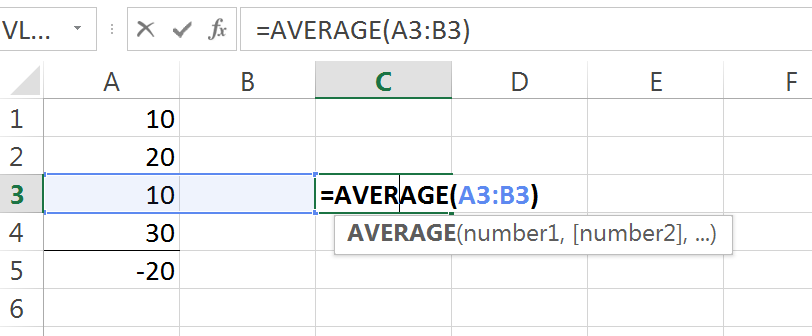
You can see in the cells below, even though I highlighted cells A1:A4 and selected Average from the AutoSum menu drop down, it then chose to average cells A3:B3.
However, if I'm to the right of those cells and do the same, the average function tries to average cells horizontally. In this case, there might not be any cells horizontally, except the one cell in the target column. Is there a way to make functions in the Formula tab drop downs calculate highlighted cells rather than some random set?
You can see in the cells below, even though I highlighted cells A1:A4 and selected Average from the AutoSum menu drop down, it then chose to average cells A3:B3.