


Asked by Staudte
at 2024-05-25 01:26:46

Point:500 Replies:3 POST_ID:828924USER_ID:11824
Topic:
Windows Server 2012;Windows 7;Microsoft Windows Operating Systems
Hi fellow experts,
I know that drive icons and labels of SUBSTed drives can (usually) be changed by working with HKEY_LOCAL_MACHINESOFTWAREMicrosoftWindowsCurrentVersionExplorerDriveIcons. However, on my system it only works on the icon - the label always remains the same as the one of the physical drive. I have restarted the whole system - no change.
I know that drive icons and labels of SUBSTed drives can (usually) be changed by working with HKEY_LOCAL_MACHINESOFTWAREMicrosoftWindowsCurrentVersionExplorerDriveIcons. However, on my system it only works on the icon - the label always remains the same as the one of the physical drive. I have restarted the whole system - no change.
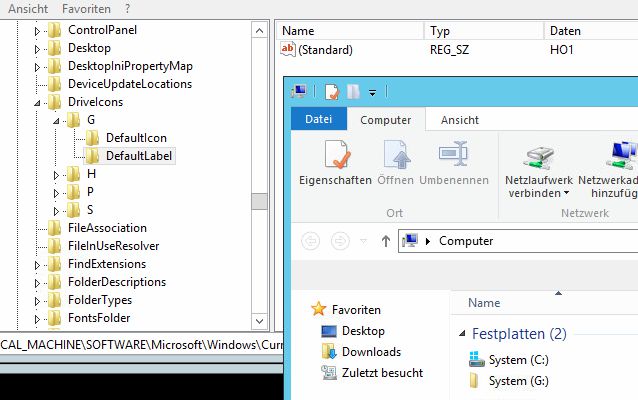
What could be wrong here? (I've done that successfully for ages on a Windows 2008 Terminalserver. Now, on a brand new 2012 Terminalserver, it used to work once (just once!), briefly, but now it suddenly stopped...)
Note: It does work on other drives like the floppy or DVD - just not on the SUBSTed drive...
Thanks for your assistance,
Tom
