


Ask Question Forum:
Model Library:2025-02-08 Updated:A.I. model is online for auto reply question page
C
O
M
P
U
T
E
R
2
8
Show
#
ASK
RECENT
←
- Underline
- Bold
- Italic
- Indent
- Step
- Bullet
- Quote
- Cut
- Copy
- Paste
- Table
- Spelling
- Find & Replace
- Undo
- Redo
- Link
- Attach
- Clear
- Code
Below area will not be traslated by Google,you can input code or other languages
Hint:If find spelling error, You need to correct it,1 by 1 or ignore it (code area won't be checked).
X-position of the mouse cursor
Y-position of the mouse cursor
Y-position of the mouse cursor
Testcursor
caretPos
Attachment:===
Asked by RNikolai001
at 2024-05-23 11:14:48
 Modify
Point:500 Replies:7 POST_ID:828917USER_ID:11817
Topic:
Spreadsheet Software;;
I am in search of an Excel 2010 formula that will find where two cells in the same row do not have any similar text. The data in the two columns is similar but not an exact match.
Expert: Glenn Ray replied at 2024-05-30 13:33:37
You're welcome. This kind of pattern matching is a hot topic with "big data" and you can see how picky matching can be (or not).
Author: RNikolai001 replied at 2024-05-30 13:24:36
Thank you for the added considerations that I had not yet forseen.
Expert: Glenn Ray replied at 2024-05-27 09:52:13
Glad it works. I'd leave the UPPER function in place then if the matches aren't case-sensitive.
-Glenn
-Glenn
Author: RNikolai001 replied at 2024-05-27 09:46:12
-No need for case sensitivity
-No words to be excluded
-Any word match will work.
Your formula works great!
-No words to be excluded
-Any word match will work.
Your formula works great!
Accepted Solution
Expert: Glenn Ray replied at 2024-05-24 22:30:24
500 points EXCELLENT
Your screenshot note says you "only want to see col B data if drastically different from Col A". While you could use conditional formatting to only show the values with differences, it would hide the "good" data and not let you see their full values. I recommend an additional column to show your test result:
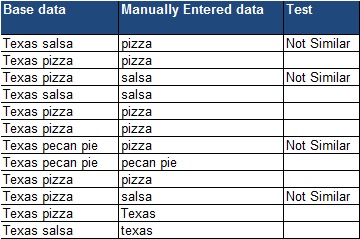
Another issue comes from this example. If one were to use this formula to test:
=IF(ISERR(FIND(UPPER(B2),UPPER(A2))),"Not Similar","")
and the base data value was "Texas salsa", then any of the following would be considered a possible match:
Texas
salsa
exas
as sal
The question now becomes: "To what level of matching do you require?" Will your manually-entered data always be a single word that one must find in the source data? Are there words to be excluded from the search, or will any word match work? Should the comparisons be case-sensitive?
Sorry to make it sound more complex, but you'll need to know these answers in order to get a working solution.
-Glenn
Author: RNikolai001 replied at 2024-05-23 19:57:40
I like where you are going...the result is always "Similartext-NOT-Exist" so I don't think it's really looking for a fuzzy match. I don't think my screenshot of the sample spreadsheet came through in my initial post of the question. I'll try to attach here:
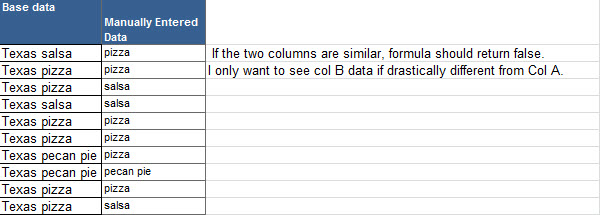
Expert: duncanb7 replied at 2024-05-23 17:40:28
You need a formula to check whether the string in CELL-A1 is exsiting in CELL-B1 in the same
rows, right ?
Try this
=IF(ISERROR(FIND(A1,B1,1))=TRUE,"Similartext-NOT-Exist","Similartext-Exist")
Hope understand your question completely.If not, please point it out
Duncan
rows, right ?
Try this
=IF(ISERROR(FIND(A1,B1,1))=TRUE,"Similartext-NOT-Exist","Similartext-Exist")
Hope understand your question completely.If not, please point it out
Duncan
