


Ask Question Forum:
Model Library:2025-02-08 Updated:A.I. model is online for auto reply question page
C
O
M
P
U
T
E
R
2
8
Show
#
ASK
RECENT
←
- Underline
- Bold
- Italic
- Indent
- Step
- Bullet
- Quote
- Cut
- Copy
- Paste
- Table
- Spelling
- Find & Replace
- Undo
- Redo
- Link
- Attach
- Clear
- Code
Below area will not be traslated by Google,you can input code or other languages
Hint:If find spelling error, You need to correct it,1 by 1 or ignore it (code area won't be checked).
X-position of the mouse cursor
Y-position of the mouse cursor
Y-position of the mouse cursor
Testcursor
caretPos
Attachment:===
Asked by MECIT
at 2024-11-18 09:10:25
 Modify
Point:500 Replies:17 POST_ID:828811USER_ID:11716
Topic:
Windows Server 2008;Encryption for Network Security;Active Directory
When renewing the certificate for the Subordinate CA, it is only for 1 year but when I look at the template it is for 5 years.
Is there a way to resolve this so it has 5 years?
Can i make it longer than 5 years?
Is there a way to resolve this so it has 5 years?
Can i make it longer than 5 years?
Expert: Mahesh replied at 2024-11-19 06:01:34
You have faced really very weired issue.
Happy to see now its resolved
Thanks
Mahesh
Happy to see now its resolved
Thanks
Mahesh
Author: MECIT replied at 2024-11-19 05:55:05
Thanks for your help. Now the certificate is vailid until 2029.
Accepted Solution
Expert: Mahesh replied at 2024-11-19 05:24:44
500 points EXCELLENT
I think, the only way to change subordinate CA validity is to duplicate existing version 1 template named 'Subordinate Certification Authority' and create custom version 2 or 3 template with custom validity settings. Do not forget to add this template to Issuing Template list on issuer.
Since subordinate CA hardcodes default template name it is necessary to create (or edit existing) CAPolicy.inf on subordinate CA by adding the following line to [RequestAttributes] section:
[Version]
Signature = "$Windows NT$"
[RequestAttributes]
CertificateTemplate = "CustomTemplateCommonName"
This setting will enforce CA server to use custom template information instead of default template. Now you can setup new Enterprise Subordinate CA and use custom template that defines extended validity for SubCA certificate.
---------------------------------------------------------------------------------
Original Source:
http://en-us.sysadmins.lv/Lists/Posts/Post.aspx?ID=50
Check "Issuer is Enterprise CA" section in above post.
In the post they have mentioned that you need to increase issuer certificate validity as well which is not required in your case as your root CA validity period is upto 2062
Request you to please take mentioned steps above an check
Thanks
Mahesh
Since subordinate CA hardcodes default template name it is necessary to create (or edit existing) CAPolicy.inf on subordinate CA by adding the following line to [RequestAttributes] section:
[Version]
Signature = "$Windows NT$"
[RequestAttributes]
CertificateTemplate = "CustomTemplateCommonName"
This setting will enforce CA server to use custom template information instead of default template. Now you can setup new Enterprise Subordinate CA and use custom template that defines extended validity for SubCA certificate.
---------------------------------------------------------------------------------
Original Source:
http://en-us.sysadmins.lv/Lists/Posts/Post.aspx?ID=50
Check "Issuer is Enterprise CA" section in above post.
In the post they have mentioned that you need to increase issuer certificate validity as well which is not required in your case as your root CA validity period is upto 2062
Request you to please take mentioned steps above an check
Thanks
Mahesh
Author: MECIT replied at 2024-11-19 05:12:15
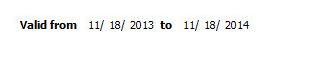
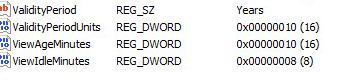
Expert: Mahesh replied at 2024-11-18 23:23:04
After changing registry still it showing 1 year..?
Author: MECIT replied at 2024-11-18 13:30:59
it still shows 1yr
Expert: Mahesh replied at 2024-11-18 13:11:13
1st you take Subordinate CA backup
then you renew Subordinate CA certificate.You will get 1 year validity period for that...
then make registry changes as mentioned in http://support.microsoft.com/kb/254632
Then stop and start CA service and check
Thanks
then you renew Subordinate CA certificate.You will get 1 year validity period for that...
then make registry changes as mentioned in http://support.microsoft.com/kb/254632
Then stop and start CA service and check
Thanks
Author: MECIT replied at 2024-11-18 12:53:20
after stopping and starting the service do I need to renew the sub ca sertificate or should it change by itself.
Expert: Mahesh replied at 2024-11-18 12:08:04
Ok
Thanks
If you could please do steps mentioned in my step and let me know please
Thanks
If you could please do steps mentioned in my step and let me know please
Author: MECIT replied at 2024-11-18 12:04:06
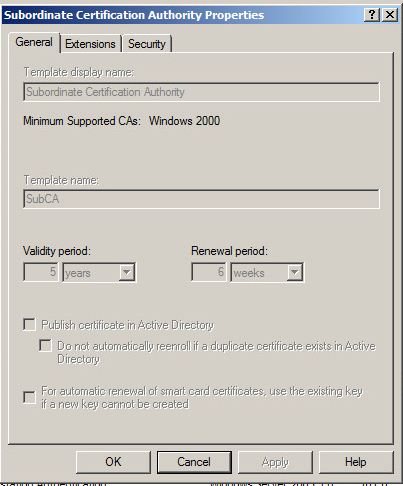
this is the template from the root CA.
Expert: Mahesh replied at 2024-11-18 10:14:08
Ok
No need to change root CA validity period
Are you sure that subordinate CA templete has 5 years validity please?
Try below.1st you renew subordinate CA certificate..
May be you get 1 yeat validity for that
then You can try steps mentioned in below article to extend validity of subordinate CA certificate.
http://support.microsoft.com/kb/254632
Please take subordinate CA backup 1st prior to proceed.
This should work
Thanks
No need to change root CA validity period
Are you sure that subordinate CA templete has 5 years validity please?
Try below.1st you renew subordinate CA certificate..
May be you get 1 yeat validity for that
then You can try steps mentioned in below article to extend validity of subordinate CA certificate.
http://support.microsoft.com/kb/254632
Please take subordinate CA backup 1st prior to proceed.
This should work
Thanks
Author: MECIT replied at 2024-11-18 09:52:52
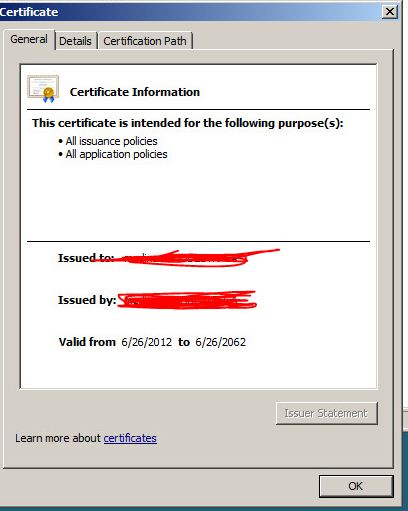
2062 is on the Root CA certificate
Expert: Mahesh replied at 2024-11-18 09:49:17
2062......
Check expiry date of Root CA certificate please
It must be equal or little bit more than 1 year
If thats the case, you can renew root CA certificate.
then renew Subordinate CA certificate..
Check expiry date of Root CA certificate please
It must be equal or little bit more than 1 year
If thats the case, you can renew root CA certificate.
then renew Subordinate CA certificate..
Author: MECIT replied at 2024-11-18 09:40:08
Root CA valid until 2062
below is on the Root CA
On the ValidityPeriod = Years
on the ValidityPeroidUnits = 1
Do I need to change this?
below is on the Root CA
On the ValidityPeriod = Years
on the ValidityPeroidUnits = 1
Do I need to change this?
Expert: Mahesh replied at 2024-11-18 09:33:39
What is your Root CA expiry date ?
Your subordinate CA can't get 5 years validity if your Root CA certificate authority expiry date before that (In your case may be one year from today)
You need to renew Root CA certificate authority validity period 1st
then you can extend subordinate CA validity period
Imp. Take CA backup 1st prior to make modificationns.
The link provided by Duncan is correct...
Your subordinate CA can't get 5 years validity if your Root CA certificate authority expiry date before that (In your case may be one year from today)
You need to renew Root CA certificate authority validity period 1st
then you can extend subordinate CA validity period
Imp. Take CA backup 1st prior to make modificationns.
The link provided by Duncan is correct...
Author: MECIT replied at 2024-11-18 09:27:19
Just so I understand, if I only need the sub CA, follow steps 5-8 only..
Would this be correct?
Would this be correct?
Expert: duncanb7 replied at 2024-11-18 09:16:29
Did you take a look at this, may follow its steps again.
http://microsoftguru.com.au/2011/12/30/how-to-extend-root-ca-and-sub-ca-validation-period-in-windows-server-2008-r2-environment-step-by-step-guide/
Hope I understand your question , if not, please point it out
Duncan
http://microsoftguru.com.au/2011/12/30/how-to-extend-root-ca-and-sub-ca-validation-period-in-windows-server-2008-r2-environment-step-by-step-guide/
Hope I understand your question , if not, please point it out
Duncan
