


Ask Question Forum:
Model Library:2025-02-08 Updated:A.I. model is online for auto reply question page
C
O
M
P
U
T
E
R
2
8
Show
#
ASK
RECENT
←
- Underline
- Bold
- Italic
- Indent
- Step
- Bullet
- Quote
- Cut
- Copy
- Paste
- Table
- Spelling
- Find & Replace
- Undo
- Redo
- Link
- Attach
- Clear
- Code
Below area will not be traslated by Google,you can input code or other languages
Hint:If find spelling error, You need to correct it,1 by 1 or ignore it (code area won't be checked).
X-position of the mouse cursor
Y-position of the mouse cursor
Y-position of the mouse cursor
Testcursor
caretPos
Attachment:===
Asked by duncanb7
at 2024-07-12 05:56:51
 Modify
Point:500 Replies:55 POST_ID:828587USER_ID:11059
Topic:
Network Routers;Networking Hardware;TCP/IP
I got one computer window 7 and the other window xp computer connected to one ADSL device which has one phone line and 4 external port for connection, of couse, also have AC charger connection.
Recently, I have been studying ssome network tutorial about, switch, ADSL, router, gateway, subnetwork, subnet mask. sometimes, get confused with those technical term.
So try to bring up some questions as follows:
When I type ipconfig on window 7 command line, it will show me as these
PPP adaptor:
DNS SUffix:
IP address:218.102.165.23
Subnet Mask: 255.255.2555.255
Default Gateway:0.0.0.0
Ethernet Adaptor:
IP address: 169.254.109.43
Subnet mask : 255:255:0.0
Default gateway:
Question-1: The gateway is refered to my ADSL device, Right ?
Question-2: Default Gateway address is address to locate to my ADSL device, Right ?
Question-3: Why it is 0.0.0.0 as I know from the tutorial, 0.0.0.0 is not allowed ?
and 0.0.0.0 is meaning not connecting to netwrok, Right ?
Question-4:subnet mask 255.255.255.255.255 is allowed, Right ? but what class of address,
Class A,B,C,D, E ?
Question:5- Finally question all IP address and subnet mask is automatically given by my ISP company when I do internet connection nowsday, right ? As my memory for ten year ago, we needed to type subnet mask by user before connection, Why ?
Please advise
Duncan
Recently, I have been studying ssome network tutorial about, switch, ADSL, router, gateway, subnetwork, subnet mask. sometimes, get confused with those technical term.
So try to bring up some questions as follows:
When I type ipconfig on window 7 command line, it will show me as these
PPP adaptor:
DNS SUffix:
IP address:218.102.165.23
Subnet Mask: 255.255.2555.255
Default Gateway:0.0.0.0
Ethernet Adaptor:
IP address: 169.254.109.43
Subnet mask : 255:255:0.0
Default gateway:
Question-1: The gateway is refered to my ADSL device, Right ?
Question-2: Default Gateway address is address to locate to my ADSL device, Right ?
Question-3: Why it is 0.0.0.0 as I know from the tutorial, 0.0.0.0 is not allowed ?
and 0.0.0.0 is meaning not connecting to netwrok, Right ?
Question-4:subnet mask 255.255.255.255.255 is allowed, Right ? but what class of address,
Class A,B,C,D, E ?
Question:5- Finally question all IP address and subnet mask is automatically given by my ISP company when I do internet connection nowsday, right ? As my memory for ten year ago, we needed to type subnet mask by user before connection, Why ?
Please advise
Duncan
Expert: John Hurst replied at 2024-07-13 11:32:31
@duncanb7 - 192.168.x.x is not old, it is a current internally routed address that does not appear in the external world. The other addresses you pointed to are external addresses (from your ISP). You are using external addresses for your two computers because you have two external IP addresses.
... Thinkpads_User
... Thinkpads_User
Author: duncanb7 replied at 2024-07-13 09:53:58
when you mention192,168.X.X ip address that might be
the old stuff for using dial-up connection(single modem) and nowsday
using broadband connection(using DSL) for auto configuration.
So that is why my IP address is 203.x.x.x or 218.x.x.x
the old stuff for using dial-up connection(single modem) and nowsday
using broadband connection(using DSL) for auto configuration.
So that is why my IP address is 203.x.x.x or 218.x.x.x
Author: duncanb7 replied at 2024-07-12 09:36:17
http://en.wikipedia.org/wiki/Default_gateway for memo only
Expert: John Hurst replied at 2024-07-12 09:16:42
@duncanb7 - Thanks and please do ask a new question. Keep it very simple so as to help yourself.
.... Thinkpads_User
.... Thinkpads_User
Author: duncanb7 replied at 2024-07-12 09:06:46
thanks for all of your reply please don't mind the point allocation in this thread
since I also get a liitle bit confused from the reply
I will write new thread to continue this topic
since I also get a liitle bit confused from the reply
I will write new thread to continue this topic
Accepted Solution
Expert: John Hurst replied at 2024-07-12 08:45:53
34 points GOOD
I mean the external gateway is not relevant to your computer, it is not used by your computer or by any applications on your computer. Your applications do not affect the external gateway and are not affected by the external gateway. The gateway of 0.0.0.0 in ipconfig is just a placeholder because Windows 7 does not know what it is and cannot know (using ipconfig).
You really now have drifted into very elementary networking and that needs to be a new question.
... Thinkpads_User
You really now have drifted into very elementary networking and that needs to be a new question.
... Thinkpads_User
Author: duncanb7 replied at 2024-07-12 08:32:16
@duncanb7 - As we have said: On your computer, the gateway of the External IP is just a placeholder. The ISP is in control of it.
thinkpad_user, you mean for my window 7 computercase default gateway 0.0.0.0 is just buffer or file or memory in my PC and controlled by ISP, Right.
BE reminded, I also use xampp server for both PC, is it affected default gateway setting ?
thinkpad_user, you mean for my window 7 computercase default gateway 0.0.0.0 is just buffer or file or memory in my PC and controlled by ISP, Right.
BE reminded, I also use xampp server for both PC, is it affected default gateway setting ?
Assisted Solution
Expert: John Hurst replied at 2024-07-12 08:28:12
33 points GOOD
@duncanb7 - You need to look up the documentation for your ADSL modem or ask your ISP. There are as many ways as modems.
I now have to bail out here. Along with Erniebeek, we have really answered all your questions.
Cheers, ... Thinkpads_User
I now have to bail out here. Along with Erniebeek, we have really answered all your questions.
Cheers, ... Thinkpads_User
Author: duncanb7 replied at 2024-07-12 08:23:23
How you do that to log on ADSL, could tell me how ?
Assisted Solution
Expert: John Hurst replied at 2024-07-12 08:21:32
33 points GOOD
@duncanb7 - As we have said: On your computer, the gateway of the External IP is just a placeholder. The ISP is in control of it.
If you need to know it (it is not relevant), log into the ADSL device with a Web Browser window and get it.
Here is the gateway for my own external connection.
If you need to know it (it is not relevant), log into the ADSL device with a Web Browser window and get it.
Here is the gateway for my own external connection.
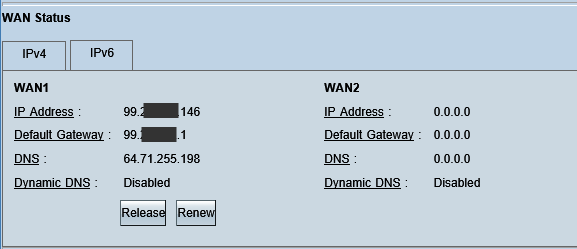
... Thinkpads_User
Author: duncanb7 replied at 2024-07-12 08:13:28
A-PPP connection is no need default gateway, Right ?
No. It needs it. You just do not have it and you can't get it.
===========================
Thinkpad_user, but why I still connect to internet with default gateway 0.0.0.0
if PPP connection needs default gateway ?
No. It needs it. You just do not have it and you can't get it.
===========================
Thinkpad_user, but why I still connect to internet with default gateway 0.0.0.0
if PPP connection needs default gateway ?
Expert: John Hurst replied at 2024-07-12 08:09:18
A-PPP connection is no need default gateway, Right ?
No. It needs it. You just do not have it and you can't get it.
B-subnet mask 255.255.0.0 or 255.255.255.0 or 255.0.0.0 is not related to which port of
ADSL is connected, Right ?
Yes, but that doesn't relate much because the subnet mask you have is related to 169.254.x.x and does not relate to your internet.
..... Thinkpads_User
No. It needs it. You just do not have it and you can't get it.
B-subnet mask 255.255.0.0 or 255.255.255.0 or 255.0.0.0 is not related to which port of
ADSL is connected, Right ?
Yes, but that doesn't relate much because the subnet mask you have is related to 169.254.x.x and does not relate to your internet.
..... Thinkpads_User
Assisted Solution
Expert: Ernie Beek replied at 2024-07-12 08:09:00
50 points GOOD
@Thinkpads_User: Agree (I think we say that the same way :)
Somtimes I imply things that I'd better write down in some cases.
Somtimes I imply things that I'd better write down in some cases.
Expert: John Hurst replied at 2024-07-12 08:06:51
Erniebeek wrote "If the two machines are physically connected then, thanks to the APIPA addresses, they are in the same network and should be able to communicate with each other. "
Yes, indeed, but two machines connected will not get internet via 169.254.x.x. In this case, internet is coming from external IP addresses.
@duncanb7 - Erniebeek and I are saying very similar things. We just say it in different ways.
... Thinkpads_User
Yes, indeed, but two machines connected will not get internet via 169.254.x.x. In this case, internet is coming from external IP addresses.
@duncanb7 - Erniebeek and I are saying very similar things. We just say it in different ways.
... Thinkpads_User
Author: duncanb7 replied at 2024-07-12 08:05:33
Yes as I said 169.254 is only for internal not for internet.
Expert: Ernie Beek replied at 2024-07-12 08:05:23
Both are correct (A and B :)
Author: duncanb7 replied at 2024-07-12 08:04:48
So the conclusion:
A-PPP connection is no need default gateway, Right ?
B-subnet mask 255.255.0.0 or 255.255.255.0 or 255.0.0.0 is not related to which port of
ADSL is connected, Right ?
A-PPP connection is no need default gateway, Right ?
B-subnet mask 255.255.0.0 or 255.255.255.0 or 255.0.0.0 is not related to which port of
ADSL is connected, Right ?
Expert: John Hurst replied at 2024-07-12 08:03:56
To repeat: 169.254.x.x will NOT give you internet. It won't. If it does FTP fine, but that is not internet.
But you ARE using TWO external IP addresses (218.x.x.x) for internet.
... Thinkpads_User
But you ARE using TWO external IP addresses (218.x.x.x) for internet.
... Thinkpads_User
Expert: Ernie Beek replied at 2024-07-12 08:02:34
I tried not to use ADSL(so PPP is not connected) and directly connected two PC through one cable and both report 169.254.x.x. auto IPv4 address and I successfully using FTP filezilla to transfer from each others by typing 169.254.x.x., username, password, port21
that experiemt proving ethernet is using 169.254.x.x. IPv4 address
That is correct. If the two machines are physically connected then, thanks to the APIPA addresses, they are in the same network and should be able to communicate with each other.
that experiemt proving ethernet is using 169.254.x.x. IPv4 address
That is correct. If the two machines are physically connected then, thanks to the APIPA addresses, they are in the same network and should be able to communicate with each other.
Expert: Ernie Beek replied at 2024-07-12 08:00:26
Again, the subnet mask has nothing to do with which port you use on your router. Read about APIPA, the network address is 169.254.0.0 so the corresponding subnet is 255.255.0.0.
Author: duncanb7 replied at 2024-07-12 07:59:59
I tried not to use ADSL(so PPP is not connected) and directly connected two PC through one cable and both report 169.254.x.x. auto IPv4 address and I successfully using FTP filezilla to transfer from each others by typing 169.254.x.x., username, password, port21
that experiemt proving ethernet is using 169.254.x.x. IPv4 address
that experiemt proving ethernet is using 169.254.x.x. IPv4 address
Expert: John Hurst replied at 2024-07-12 07:58:28
both computer are using PPP connection, Yes
I did miss above that you have TWO external IP addresses. I had assumed ONE because you have one phone line.
So you get internet by External IP (which is fine) but the subnet mask, gateway and DNS are all under the control of the ISP.
So sorry, you are not using an internal network - only external IP addresses.
.... Thinkpads_User
I did miss above that you have TWO external IP addresses. I had assumed ONE because you have one phone line.
So you get internet by External IP (which is fine) but the subnet mask, gateway and DNS are all under the control of the ISP.
So sorry, you are not using an internal network - only external IP addresses.
.... Thinkpads_User
Assisted Solution
Expert: John Hurst replied at 2024-07-12 07:53:48
50 points GOOD
Here is a decent explanation of 169.254.x.x
http://ask-leo.com/why_cant_i_connect_with_a_169254xx_ip_address.html
There will not be any gateway for a 169.254.x.x address.
The gateway internally will come from the internal IP address. I do not know why you cannot find it, but it must be there for you to have internet. 192.168 was an example.
Here is a WiKi article on internal addresses. You can see what they are and that 169.254. is not one of them.
https://en.wikipedia.org/wiki/Private_network
... Thinkpads_User
http://ask-leo.com/why_cant_i_connect_with_a_169254xx_ip_address.html
There will not be any gateway for a 169.254.x.x address.
The gateway internally will come from the internal IP address. I do not know why you cannot find it, but it must be there for you to have internet. 192.168 was an example.
Here is a WiKi article on internal addresses. You can see what they are and that 169.254. is not one of them.
https://en.wikipedia.org/wiki/Private_network
... Thinkpads_User
Author: duncanb7 replied at 2024-07-12 07:53:00
why both subnet mask are same(255.255.0.0) if they connect to different port on ADSL
Is it okay for the same ?
Is it okay for the same ?
Author: duncanb7 replied at 2024-07-12 07:51:33
both computer are using PPP connection, Yes
Author: duncanb7 replied at 2024-07-12 07:50:59
So could I conclude the default gateway on my two computer is no use or no meaning since
both computer are using PPP connection , RIght ?
both computer are using PPP connection , RIght ?
Expert: BM-vnext replied at 2024-07-12 07:46:33
But this question is about understanding PPP and the working of your ADSL router.
I suppose your internet connection is operational on both machines via the PPP adapter?
I suppose your internet connection is operational on both machines via the PPP adapter?
Author: duncanb7 replied at 2024-07-12 07:45:30
As you mean, default gateway is related to ethernet Adaptor instead of PPP adaptor?
SO what is default gateway for my case?
Eniebeek or Thinkpad_user
SO what is default gateway for my case?
Eniebeek or Thinkpad_user
Author: duncanb7 replied at 2024-07-12 07:43:12
after go throught ipconfig/all result on two computer, there are no such address
about 192.168.1.X, so there is no such address of 192.
I had seen before, sometimes, it will go to 169.254.x.x and sometimes go to 192.168.x.x
for ethernet IP addresss from auto configuration.
Anyway 192.168.x.x or 169.254.x.x is just for auto IP for ethernet, so don't just put too much focus on that
about 192.168.1.X, so there is no such address of 192.
I had seen before, sometimes, it will go to 169.254.x.x and sometimes go to 192.168.x.x
for ethernet IP addresss from auto configuration.
Anyway 192.168.x.x or 169.254.x.x is just for auto IP for ethernet, so don't just put too much focus on that
Expert: Ernie Beek replied at 2024-07-12 07:27:54
Agree with thinkpads_user. And again, like said, the Default gateway is irrelevant with a PPP adapter.
Assisted Solution
Expert: John Hurst replied at 2024-07-12 07:25:04
50 points GOOD
Thank you for posting the information. I think you still have an adapter missing in your output.
Both computers show the PPP adapter and that is not really relevant because it is assigned by the ISP and as we said above, all the information from it is not know to your ipconfig command.
Now you then show both computers as having an "Ethernet" adaptor with IP 169.254.x.x. This is the auto configuration IP and is for private internal FTP.
There must be another Ethernet adapter with an IP like 192.168.1.x . That is the adapter giving you internal DHCP as you reported above (first reported as NO DHCP).
... Thinkpads_User
Both computers show the PPP adapter and that is not really relevant because it is assigned by the ISP and as we said above, all the information from it is not know to your ipconfig command.
Now you then show both computers as having an "Ethernet" adaptor with IP 169.254.x.x. This is the auto configuration IP and is for private internal FTP.
There must be another Ethernet adapter with an IP like 192.168.1.x . That is the adapter giving you internal DHCP as you reported above (first reported as NO DHCP).
... Thinkpads_User
Author: duncanb7 replied at 2024-07-12 07:21:08
Both IP address for ethernet adaptor are generated by auto configuration(be reminded)
Author: duncanb7 replied at 2024-07-12 07:19:48
On second computer the Default gateway is same as IP address of PPP
Author: duncanb7 replied at 2024-07-12 07:18:41
it is good for me from your reply at least know more network stuff and trigger more
questions
questions
Author: duncanb7 replied at 2024-07-12 07:17:28
Dear Thinkpad_user,
since I am using Chinese version of window, so I could not send ipconfig output to you.
I just have these translation to english:
First computer with window 7 for ipconfig output:
=======================================
PPP adaptor:
DNS SUffix:
IP address:218.102.165.23
Subnet Mask: 255.255.2555.255
Default Gateway:0.0.0.0
DHCP Enable: NO
Ethernet Adaptor:
IP address: 169.254.109.43
Subnet mask : 255:255:0.0
Default gateway:
DHCP Enable: YES
Second computer with Window XP for IPconfig output
==============================================
PPP adaptor:
DNS SUffix:
IP address:218.102.198.88
Subnet Mask: 255.255.2555.255
Default Gateway:218.102.198.88
DHCP Enable: NO
Ethernet Adaptor:
IP address: 169.254.39.175
Subnet mask : 255:255:0.0
Default gateway:
DHCP Enable: YES
since I am using Chinese version of window, so I could not send ipconfig output to you.
I just have these translation to english:
First computer with window 7 for ipconfig output:
=======================================
PPP adaptor:
DNS SUffix:
IP address:218.102.165.23
Subnet Mask: 255.255.2555.255
Default Gateway:0.0.0.0
DHCP Enable: NO
Ethernet Adaptor:
IP address: 169.254.109.43
Subnet mask : 255:255:0.0
Default gateway:
DHCP Enable: YES
Second computer with Window XP for IPconfig output
==============================================
PPP adaptor:
DNS SUffix:
IP address:218.102.198.88
Subnet Mask: 255.255.2555.255
Default Gateway:218.102.198.88
DHCP Enable: NO
Ethernet Adaptor:
IP address: 169.254.39.175
Subnet mask : 255:255:0.0
Default gateway:
DHCP Enable: YES
Expert: John Hurst replied at 2024-07-12 07:12:54
@erniebeek - we are not too far apart :)
I think we just posted differently on 0.0.0.0 . Placeholder is probably better language. I just said it is under the control of the ISP.
.... Thinkpads_User
I think we just posted differently on 0.0.0.0 . Placeholder is probably better language. I just said it is under the control of the ISP.
.... Thinkpads_User
Expert: Ernie Beek replied at 2024-07-12 07:03:47
@Thinkpads_User: Crosspost :)
And it seems we disagree on some points.
And it seems we disagree on some points.
Assisted Solution
Expert: Ernie Beek replied at 2024-07-12 07:02:38
50 points GOOD
Let's see if I can provide you with some answers.
Question-1: The gateway is refered to my ADSL device, Right ?
Question-2: Default Gateway address is address to locate to my ADSL device, Right ?
The DG for your PPP adapter is irrelevant (not used) because it's point2point. So windows fills it with this value as a 'placeholder'
Question-3: Why it is 0.0.0.0 as I know from the tutorial, 0.0.0.0 is not allowed ?
and 0.0.0.0 is meaning not connecting to netwrok, Right ?
The DG should be a host address. If a machine gets a packet destined for a network it doesn't know, it sends it to the DG. So it never can be a network address (which 0.0.0.0 is, sort of).
Question-4:subnet mask 255.255.255.255.255 is allowed, Right ? but what class of address,
Class A,B,C,D, E ?
No class, try googling for CIDR
Question:5- Finally question all IP address and subnet mask is automatically given by my ISP company when I do internet connection nowsday, right ? As my memory for ten year ago, we needed to type subnet mask by user before connection, Why ?
Not sure about that one. Can't really remember if I had to do that.
Question-1: The gateway is refered to my ADSL device, Right ?
Question-2: Default Gateway address is address to locate to my ADSL device, Right ?
The DG for your PPP adapter is irrelevant (not used) because it's point2point. So windows fills it with this value as a 'placeholder'
Question-3: Why it is 0.0.0.0 as I know from the tutorial, 0.0.0.0 is not allowed ?
and 0.0.0.0 is meaning not connecting to netwrok, Right ?
The DG should be a host address. If a machine gets a packet destined for a network it doesn't know, it sends it to the DG. So it never can be a network address (which 0.0.0.0 is, sort of).
Question-4:subnet mask 255.255.255.255.255 is allowed, Right ? but what class of address,
Class A,B,C,D, E ?
No class, try googling for CIDR
Question:5- Finally question all IP address and subnet mask is automatically given by my ISP company when I do internet connection nowsday, right ? As my memory for ten year ago, we needed to type subnet mask by user before connection, Why ?
Not sure about that one. Can't really remember if I had to do that.
Assisted Solution
Expert: John Hurst replied at 2024-07-12 07:00:00
100 points GOOD
Let us please go back to your original question.
PPP adaptor:
DNS SUffix:
IP address:218.102.165.23 <--- this is external and not used by your PC
Subnet Mask: 255.255.2555.255 <-- this is correct for this IP.
Default Gateway:0.0.0.0 <-- this is incorrect and just may not be known. Your ISP will have a gateway for the external IP. They have to.
Ethernet Adaptor: <--- this is not a working IP connection for internet.
IP address: 169.254.109.43
Subnet mask : 255:255:0.0
Default gateway:
Question-1: The gateway is referred to my ADSL device, Right ?
Yes, but it is not showing up. You need to check with your ISP on this.
Question-2: Default Gateway address is address to locate to my ADSL device, Right ?
What do you mean? The ISP controls this and so long as they have connected you, it may not matter. The ISP's gateway is not relevant to your internal connection.
Question-3: Why it is 0.0.0.0 as I know from the tutorial, 0.0.0.0 is not allowed ?
and 0.0.0.0 is meaning not connecting to network, Right ?
It is under the control of your ISP and you cannot set it or change it.
Question-4:subnet mask 255.255.255.255.255 is allowed, Right ? but what class of address, Class A,B,C,D, E ?
255.255.255.255 is only for the external IP and says you have one of those.
Question:5- Finally question all IP address and subnet mask is automatically given by my ISP company when I do internet connection nowsday, right ? As my memory for ten year ago, we needed to type subnet mask by user before connection, Why ?
The ISP provides all the external addressing; IP, Gateway, Subnet mask, and DNS. You do not set these.
You only need set your internal devices and the best way to do that is with DHCP. That will be automatic.
Please, please post the IPCONFIG for an INTERNAL connection. I think it will help you see what is happening. You have not posted that so far.
I assure you: I am not confused.
... Thinkpads_User
PPP adaptor:
DNS SUffix:
IP address:218.102.165.23 <--- this is external and not used by your PC
Subnet Mask: 255.255.2555.255 <-- this is correct for this IP.
Default Gateway:0.0.0.0 <-- this is incorrect and just may not be known. Your ISP will have a gateway for the external IP. They have to.
Ethernet Adaptor: <--- this is not a working IP connection for internet.
IP address: 169.254.109.43
Subnet mask : 255:255:0.0
Default gateway:
Question-1: The gateway is referred to my ADSL device, Right ?
Yes, but it is not showing up. You need to check with your ISP on this.
Question-2: Default Gateway address is address to locate to my ADSL device, Right ?
What do you mean? The ISP controls this and so long as they have connected you, it may not matter. The ISP's gateway is not relevant to your internal connection.
Question-3: Why it is 0.0.0.0 as I know from the tutorial, 0.0.0.0 is not allowed ?
and 0.0.0.0 is meaning not connecting to network, Right ?
It is under the control of your ISP and you cannot set it or change it.
Question-4:subnet mask 255.255.255.255.255 is allowed, Right ? but what class of address, Class A,B,C,D, E ?
255.255.255.255 is only for the external IP and says you have one of those.
Question:5- Finally question all IP address and subnet mask is automatically given by my ISP company when I do internet connection nowsday, right ? As my memory for ten year ago, we needed to type subnet mask by user before connection, Why ?
The ISP provides all the external addressing; IP, Gateway, Subnet mask, and DNS. You do not set these.
You only need set your internal devices and the best way to do that is with DHCP. That will be automatic.
Please, please post the IPCONFIG for an INTERNAL connection. I think it will help you see what is happening. You have not posted that so far.
I assure you: I am not confused.
... Thinkpads_User
Author: duncanb7 replied at 2024-07-12 06:52:28
Thinkpad_user, you understand more about what we are asking question ?
Author: duncanb7 replied at 2024-07-12 06:50:57
it seems erniebeek sounds correct since nowsday we are using PPP (point to point protocol)
so it would set 255.255.255.255 whatever using window 7 or Xp
I got two computers connecting to one ADS using window & and window XP for one and other computer respectivelyL
so it would set 255.255.255.255 whatever using window 7 or Xp
I got two computers connecting to one ADS using window & and window XP for one and other computer respectivelyL
Author: duncanb7 replied at 2024-07-12 06:47:12
169.254.109.43 is Ethernet IP address for private IP addressing that is internal address
for ethernet LAN network that is generated by auto configuration. SO when you need transfer file by ftp from one computer to other one at your home PC network, you need that
So don't confuse, 169.254.109.43 is NOT IP address for internet
for ethernet LAN network that is generated by auto configuration. SO when you need transfer file by ftp from one computer to other one at your home PC network, you need that
So don't confuse, 169.254.109.43 is NOT IP address for internet
Assisted Solution
Expert: Ernie Beek replied at 2024-07-12 06:46:20
50 points GOOD
This is some older text, but relevant to this case I think:
"The reason the SM is /32 is that the RFC for PPP negotiation does not specify what the subnet mask should be - indeed there is no need for a subnet mask for a PPP (or PPPoE) connection since it is, by definition, a point to point connection. There are only 2 hosts in the connection, so when one machine needs to contact the other, the packets are simply placed on that interface and the other host will receive them.
Specifically, TCP/IP info is negotiated through IPCP and the RFC for this, RFC 1332, does not list the SM as a legal value.
I don't know what OS you are using, but MS simply puts a "place holder" in for this value. Win98/NT clients typically receive a SM based on the Class of address they receive (i.e. if it receives 10.x.x.x, it will receive a 8 bit mask - 192.168.x.x receives a 16 bit mask) and Windows 2000 displays the "correct" behavior as it shows a 32 bit mask."
Source: http://arstechnica.com/civis/viewtopic.php?f=10&t=957040
"The reason the SM is /32 is that the RFC for PPP negotiation does not specify what the subnet mask should be - indeed there is no need for a subnet mask for a PPP (or PPPoE) connection since it is, by definition, a point to point connection. There are only 2 hosts in the connection, so when one machine needs to contact the other, the packets are simply placed on that interface and the other host will receive them.
Specifically, TCP/IP info is negotiated through IPCP and the RFC for this, RFC 1332, does not list the SM as a legal value.
I don't know what OS you are using, but MS simply puts a "place holder" in for this value. Win98/NT clients typically receive a SM based on the Class of address they receive (i.e. if it receives 10.x.x.x, it will receive a 8 bit mask - 192.168.x.x receives a 16 bit mask) and Windows 2000 displays the "correct" behavior as it shows a 32 bit mask."
Source: http://arstechnica.com/civis/viewtopic.php?f=10&t=957040
Author: duncanb7 replied at 2024-07-12 06:44:03
Dear Thinkpad_users,
You might be wrong, there are two portion
one is PPP adaptor connection and Ethernet Adaptor connection
PPP is connecting to internet
Ethernet is connecting to internal LAN network
so when you do ipconfig/all you will report PPP and Ehternet connection information for you
Right ?
AND Sorry last typing DPCH is not correct that should be DHCP instead
Whatever, my internet connection and ethernet connection is well connected
and I can browser any location in internet for both computer and then I also able to
ftp file from one computer to the other computer on my network, so all TCP/IP
connection is good. so you don't need to focus on connection issue
You might be wrong, there are two portion
one is PPP adaptor connection and Ethernet Adaptor connection
PPP is connecting to internet
Ethernet is connecting to internal LAN network
so when you do ipconfig/all you will report PPP and Ehternet connection information for you
Right ?
AND Sorry last typing DPCH is not correct that should be DHCP instead
Whatever, my internet connection and ethernet connection is well connected
and I can browser any location in internet for both computer and then I also able to
ftp file from one computer to the other computer on my network, so all TCP/IP
connection is good. so you don't need to focus on connection issue
Expert: John Hurst replied at 2024-07-12 06:43:02
169.254.109.43 is the auto configuration IP and that device will not get internet - no way.
So you are reporting on the wrong device.
Please do an IPCONFIG /ALL and post it here.
Also, you may have changed TCP/IP on your computer and messed it up.
Follow the link below from Microsoft to reset TCP/IP.
http://support.microsoft.com/kb/299357
I think you may have set one or both your computers up with STATIC IP addressing and that is usually not a good idea.
.... Thinkpads_User
So you are reporting on the wrong device.
Please do an IPCONFIG /ALL and post it here.
Also, you may have changed TCP/IP on your computer and messed it up.
Follow the link below from Microsoft to reset TCP/IP.
http://support.microsoft.com/kb/299357
I think you may have set one or both your computers up with STATIC IP addressing and that is usually not a good idea.
.... Thinkpads_User
Author: duncanb7 replied at 2024-07-12 06:36:04
Dear thinkpad_users,
just follow instruction, just up one computer after disconnection power of ADL and start it
again, it report same subnet mask of 255.255.255.255. gatway is 0.0.0.0 and
ethernet Ip is still similar to 169.254.109.43. ( not as you say 192......)
But I found one thing DPCH is enabled for ethernet adaptor
and DPCH is NOT enabled for PPP adaptor after using ipconfig/all
just follow instruction, just up one computer after disconnection power of ADL and start it
again, it report same subnet mask of 255.255.255.255. gatway is 0.0.0.0 and
ethernet Ip is still similar to 169.254.109.43. ( not as you say 192......)
But I found one thing DPCH is enabled for ethernet adaptor
and DPCH is NOT enabled for PPP adaptor after using ipconfig/all
Expert: John Hurst replied at 2024-07-12 06:35:18
You must be looking at the wrong device with IPCONFIG.
Two computers connect to a router both with Internet on one ADSL modem with one phone line will not give (a) an external IP address and (b) will not have a subnet mask of 255.255.255.255.
You are reporting the external connection and asking why?
Find the internal connection and report on that. It will be different.
... Thinkpads_User
Two computers connect to a router both with Internet on one ADSL modem with one phone line will not give (a) an external IP address and (b) will not have a subnet mask of 255.255.255.255.
You are reporting the external connection and asking why?
Find the internal connection and report on that. It will be different.
... Thinkpads_User
Author: duncanb7 replied at 2024-07-12 06:30:58
Hi guys, both computer are well connecting to internet so internet connection is no problem
at all, but all subnet mask is 255.255.255.255 for both computer. So no need to contact my ISP
at all, but all subnet mask is 255.255.255.255 for both computer. So no need to contact my ISP
Expert: John Hurst replied at 2024-07-12 06:24:41
Once logged in and connected, you should still get an internal IP address.
Ask your ISP how to set up the PPP connection from a web browser that logs into the ADSL device.
Once connected via a web browser window you should be able to close the window and you should have an internal IP address as I noted above.
.... Thinkpads_User
Ask your ISP how to set up the PPP connection from a web browser that logs into the ADSL device.
Once connected via a web browser window you should be able to close the window and you should have an internal IP address as I noted above.
.... Thinkpads_User
Author: duncanb7 replied at 2024-07-12 06:21:57
Yes, I need to PPP connection from window with my passoword and login to log into my ISP
Expert: John Hurst replied at 2024-07-12 06:21:33
there are 4 ports on ADSL deivce, so it will four different subnet mask address, Right ?
No. The subnet mask will be the same for all computers on that one subnet. See my wireless IPCONFIG. I have a router in front of the cable modem and that is where I get my addressing. See below.
Wireless LAN adapter Wi-Fi:
Connection-specific DNS Suffix . :
Link-local IPv6 Address . . . . . : fe80::75d8:c8e3:62ac:4ff%13
IPv4 Address. . . . . . . . . . . : 192.168.100.102
Subnet Mask . . . . . . . . . . . : 255.255.255.0
Default Gateway . . . . . . . . . : 192.168.100.1
In your case, the router is built into the ADSL device and the IP address from the router should be internal (like 192.168.1.x) and not external (218.102.165.23).
Now I should have looked more closely as your Ethernet device has a 169.254.x.x IP which is the NOT Connected auto configuration IP.
Disconnect both computers from the ADSL device. Now unplug the ADSL device, wait 2 minutes and plug it in. Wait 2 more minutes and connect ONE computer only via Ethernet cable to the router port on the ADSL device.
Now what does IPCONFIG tell you?
No. The subnet mask will be the same for all computers on that one subnet. See my wireless IPCONFIG. I have a router in front of the cable modem and that is where I get my addressing. See below.
Wireless LAN adapter Wi-Fi:
Connection-specific DNS Suffix . :
Link-local IPv6 Address . . . . . : fe80::75d8:c8e3:62ac:4ff%13
IPv4 Address. . . . . . . . . . . : 192.168.100.102
Subnet Mask . . . . . . . . . . . : 255.255.255.0
Default Gateway . . . . . . . . . : 192.168.100.1
In your case, the router is built into the ADSL device and the IP address from the router should be internal (like 192.168.1.x) and not external (218.102.165.23).
Now I should have looked more closely as your Ethernet device has a 169.254.x.x IP which is the NOT Connected auto configuration IP.
Disconnect both computers from the ADSL device. Now unplug the ADSL device, wait 2 minutes and plug it in. Wait 2 more minutes and connect ONE computer only via Ethernet cable to the router port on the ADSL device.
Now what does IPCONFIG tell you?
Expert: Ernie Beek replied at 2024-07-12 06:16:28
Subnet mask has nothing to do with what port you plug in to. Subnet mask can be described as a way to determine the size of the network. 255.255.255.255 is one host, 255.255.255.0 are 254 hosts, etc.
I see you have a PPP adapter and an Ethernet adapter. So do you need to set up a PPP connection to your router to get to the internet?
I see you have a PPP adapter and an Ethernet adapter. So do you need to set up a PPP connection to your router to get to the internet?
Assisted Solution
Expert: BM-vnext replied at 2024-07-12 06:15:03
50 points GOOD
Dear Duncan,
Is your router connected to your pc by usb or something other than a LAN (ethernet) cable?
It seems your PPP adapter received a IP adress by your provider. The reason you don't see a default gateway is simple, the subnetmask is set to 255.255.255.255 and thus allowing no other address in the scope of your provider than the assigned ip address.
if you would connect your computer by an ethernet cable to your router, you would receive an IP address from the internal DHCP server of your router. Obviously this would be an internal address like 192.168.x.x or 10.0.x.x and your subnet would be 255.255.255.0 allowing 254 hosts in the same subnet.
the address on your ethernet adapter is an APIPA address which is automatically assigned by your computer. You can ping it and work with it, but only if your router would be in the same range. Thats why these addresses almost always mean your DHCP isn't working and something is wrong.
I hope you can make something from my message :)
Is your router connected to your pc by usb or something other than a LAN (ethernet) cable?
It seems your PPP adapter received a IP adress by your provider. The reason you don't see a default gateway is simple, the subnetmask is set to 255.255.255.255 and thus allowing no other address in the scope of your provider than the assigned ip address.
if you would connect your computer by an ethernet cable to your router, you would receive an IP address from the internal DHCP server of your router. Obviously this would be an internal address like 192.168.x.x or 10.0.x.x and your subnet would be 255.255.255.0 allowing 254 hosts in the same subnet.
the address on your ethernet adapter is an APIPA address which is automatically assigned by your computer. You can ping it and work with it, but only if your router would be in the same range. Thats why these addresses almost always mean your DHCP isn't working and something is wrong.
I hope you can make something from my message :)
Author: duncanb7 replied at 2024-07-12 06:12:21
Whatever I change to port location 1,2,3, or 4, it will report subnet mask 255.255.255.255.
Why ?
there are 4 ports on ADSL deivce, so it will four different subnet mask address, Right ?
Why ?
there are 4 ports on ADSL deivce, so it will four different subnet mask address, Right ?
Expert: John Hurst replied at 2024-07-12 06:03:11
I wonder if you are reporting the correct device. The subnet mask on a machine connected to the router portion (4 ports) of your ADSL modem should be 255.255.255.0.
Open cmd.exe again and type ipconfig /all
Look through and make sure you are looking at the section for your Ethernet device. It should come out differently than the above.
Please let us know.
.... Thinkpads_User
Open cmd.exe again and type ipconfig /all
Look through and make sure you are looking at the section for your Ethernet device. It should come out differently than the above.
Please let us know.
.... Thinkpads_User
